FAT32 Analysis
FAT32 Analysis
Introduced in August 1996 with Windows 95 Service Release 2, FAT32 remains relevant despite its age due to its lightweight design, cross-OS compatibility, and lack of permissions, making it ideal for USBs, embedded systems, and legacy devices (4GB file size limit, 2TB volume limit). However, these traits also make it vulnerable to attacks, such as Stuxnet, Mustang Panda, UNC4990, and Rubber Ducky USBs, often exploiting MITRE ATT&CK techniques like Defense Evasion (TA0005).
FAT32 Structure:
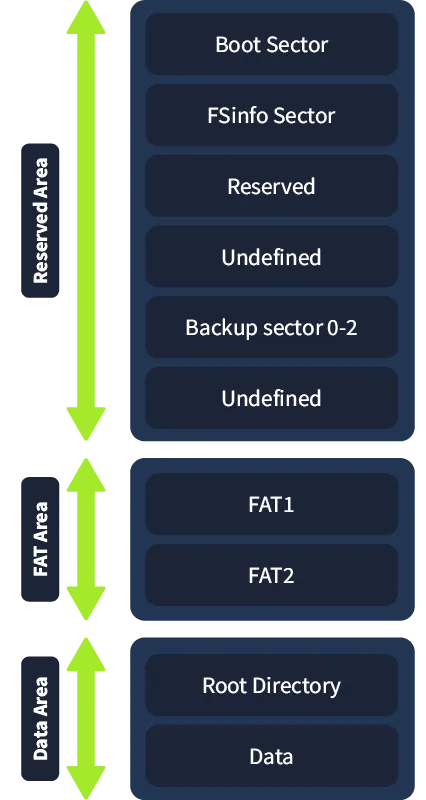
A FAT32 volume is divided into three main areas:
Reserved Area: Contains metadata for filesystem operation. FAT Area: Manages cluster allocation and file fragmentation. Data Area: Stores file and directory contents.
Reserved Area:
The Reserved Area starts at sector 0 and includes:
| Field | Sector Number | Size (Bytes) | Explanation |
|---|---|---|---|
| Boot Sector | 0 | 512 | Contains partition metadata (e.g., sector size, FAT location). |
| FSInfo Sector | 1 | 512 | Stores info on free clusters and next available cluster. |
| Reserved Sectors | 2–5 | 2048 (4 × 512) | Placeholder sectors, reserved for future use. |
| Backup Boot Sector | 6 | 512 | A backup of the Boot Sector for redundancy. |
| Additional Reserved Sectors | 7–(start of FAT) | Varies | Additional reserved space until the FAT area begins (determined from Boot Sector). |
Sector Size: Typically 512 bytes (standard for most disks).
Total Reserved Sectors: Determined from the Boot Sector (e.g., 6270 sectors in the example, starting FAT at sector 6270).
Boot Sector:
Location: Sector 0 (first 512 bytes of the partition). Contains metadata essential for the OS to access the partition, including the layout of the FAT, Root Directory, and Data Region. Includes several fields, some of which are highlighted for forensic analysis.
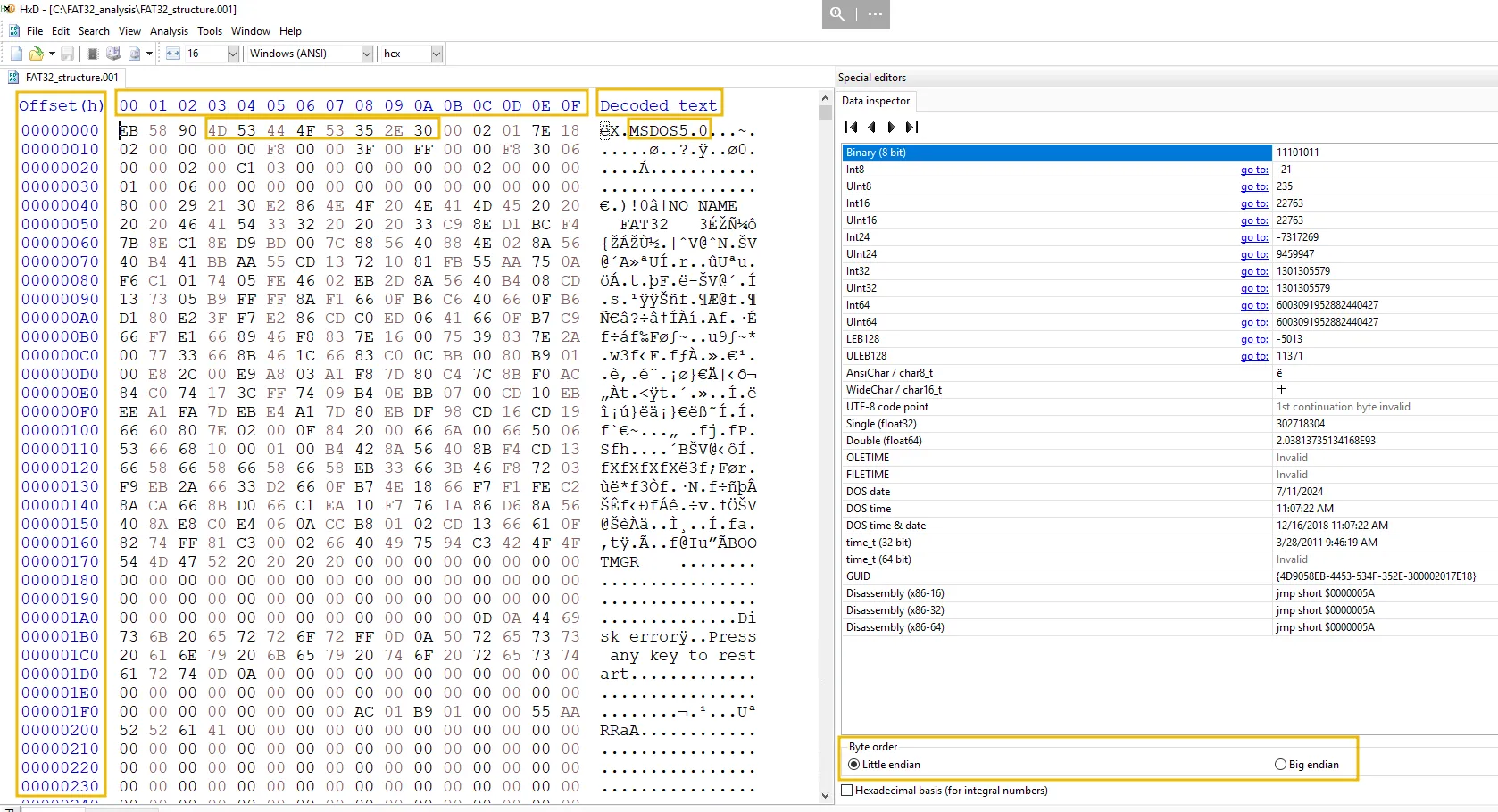
Boot Sector Fields
| Field | Subfield | Size (Bytes) | Offset (Hex) | Example Value (Hex) | Translated Value | Explanation |
|---|---|---|---|---|---|---|
| Jump Instruction | - | 3 | 00–02 | EB 58 90 | - | Allows BIOS/bootloader to jump to boot code (e.g., jumps 88 bytes, NOP for padding). |
| OEM Name | - | 8 | 03–0A | 4D 53 44 4F 53 35 2E 30 | MSDOS5.0 | Indicates the formatting tool (e.g., MS-DOS 5.0). |
| BIOS Parameter Block (BPB) | Bytes per Sector | 2 | 0B–0C | 00 02 | 512 | Sector size (standard: 512 bytes). |
| Sectors per Cluster | 1 | 0D | 01 | 1 | Number of sectors in a cluster (e.g., 1 sector/cluster; often 4KB in practice). | |
| Reserved Sectors | 2 | 0E–0F | 7E 18 | 6270 | Total reserved sectors (includes Boot Sector, FSInfo, etc.). | |
| Number of FATs | 1 | 10 | 02 | 2 | Number of FATs (FAT1 + FAT2 backup). | |
| Max Root Dir Entries | 2 | 11–12 | 00 00 | 0 | Set to 0 for FAT32 (dynamic root directory). | |
| Total Sectors | 2 or 4 | 13–14 | 00 00 | 0 | Not used for FAT32; see Total Sectors 32. | |
| Media Descriptor | 1 | 15 | F8 | - | Indicates media type (e.g., 0xF8 = fixed disk; often inaccurate in modern OSs). | |
| Sectors per FAT | 2 | 16–17 | 00 00 | 0 | Not used for FAT32; see Extended BPB. | |
| Sectors per Track | 2 | 18–19 | 3F 00 | 63 | Logical placeholder for compatibility (not physical). | |
| Number of Heads | 2 | 1A–1B | FF 00 | 255 | Logical placeholder for compatibility (not physical). | |
| Hidden Sectors | 4 | 1C–1F | 00 F8 30 06 | 103872512 | Sectors before partition start (e.g., 49GB for C:\ partition). | |
| Total Sectors 32 | - | 4 | 20–23 | 00 00 02 00 | 131072 | Total sectors in partition (e.g., 64MB for the image). |
| Extended BPB | Sectors per FAT | 4 | 24–27 | C1 03 00 00 | 961 | Sectors allocated to each FAT (FAT1 and FAT2). |
| Flags | 2 | 28–29 | 00 00 | 0 | 0 = FAT mirroring enabled (FAT1 and FAT2 are synced). | |
| Version | 2 | 2A–2B | 00 00 | 0 | FAT32 version (typically 0.0). | |
| Cluster Root Directory | 4 | 2C–2F | 02 00 00 00 | 2 | Root Directory starts at cluster 2 in the Data Region. | |
| FSInfo Sector | 2 | 30–31 | 01 00 | 1 | FSInfo Sector location (sector 1). | |
| Backup Boot Sector | 2 | 32–33 | 06 00 | 6 | Backup Boot Sector location (sector 6). | |
| Boot Code | - | 420 | 34–1F0 | - | - | Code for BIOS/UEFI to boot the volume. |
| Boot Sector Signature | - | 2 | 1F0–1F1 | 55 AA | - | Validates the sector as bootable. |
Byte Order: FAT32 uses Little Endian (Least Significant Bit first). For example, 02 00 = 512 (not 2).
Key Metadata:
Partition size (Total Sectors 32).
FAT location (Reserved Sectors + Sectors per FAT).
Root Directory location (Cluster Root Directory).
FAT Area:
Location:
FAT1: Starts after Reserved Sectors (e.g., offset 0030FC00 = 6270 × 512 bytes).
FAT2 (Backup): Starts after FAT1 (e.g., offset = (6270 + 961) × 512).
Purpose: Tracks cluster allocation for files/directories. Manages fragmentation (non-contiguous clusters). Marks bad clusters for integrity.
Structure: Each FAT entry is 32 bits (4 bytes), but only 28 bits are used. FAT entries map to clusters in the Data Region (index starts at 2; clusters 0 and 1 are reserved).
FAT Entry Values
| Value (Hex) | Meaning | Explanation |
|---|---|---|
| 00 00 00 00 | Free cluster | Cluster is unused and available for allocation. |
| 00 00 00 02 to 0F FF FF F6 | Used cluster | Points to the next cluster in the chain (e.g., 00 00 00 06 = next cluster 6). |
| 0F FF FF F7 | Bad cluster | Cluster is defective and should not be used. |
| 0F FF FF F8 to 0F FF FF FF | End of File (EOF) | Marks the last cluster in a chain (standard value). |
| FF FF FF FF | End of File (EOF) (simplified) | Alternative EOF marker (ignores reserved bits). |
Example FAT Entries (from VM ):

| FAT Cluster Index | Data Region Cluster | Value (Hex) | Meaning |
|---|---|---|---|
| 0 | - | 0F FF FF F8 | EOF (reserved cluster). |
| 1 | - | FF FF FF FF | EOF (reserved cluster). |
| 2 | 2 | 0F FF FF FF | EOF (single-cluster chain). |
| 7 | 7 | 00 00 00 08 | Points to cluster 8 (chain: 7 → 8). |
| 8 | 8 | 0F FF FF FF | EOF (chain: 7 → 8). |
| 9 | 9 | 00 00 00 0A | Points to cluster 10 (chain: 9 → 10). |
| 10 | 10 | 00 00 00 0B | Points to cluster 11 (chain: 9 → 10 → 11). |
| 11 | 11 | 00 00 00 0C | Points to cluster 12 (chain: 9 → 10 → 11 → 12). |
| 12 | 12 | 0F FF FF FF | EOF (chain: 9 → 10 → 11 → 12). |
Cluster Chains:
Files are stored in clusters, and the FAT tracks the chain of clusters (e.g., file at cluster 9 spans clusters 9 → 10 → 11 → 12). Each FAT entry points to the next cluster or marks EOF.
Data Area
Components:
Root Directory: Acts as an index, storing metadata about files and directories. Data Region: Stores the actual contents of files.
Location:
Starts after the FAT Area (FAT1 and FAT2). First two clusters (0 and 1) are reserved for system use (virtual, not physical). Root Directory begins at cluster 2 (third cluster, since numbering starts at 0).
Dynamic Growth:
Since FAT32, the Root Directory does not have a fixed size or reserved clusters. It starts at cluster 2 and expands to the next free cluster (tracked by the FAT) as needed.
Root Directory
Stores metadata for files and directories in the Data Region.
Entry Types:
Long File Name (LFN): Stores the full filename in UTF-16, overcoming Short File Name limitations.
Short File Name (SFN): Stores file attributes, timestamps, starting cluster, and size in the 8.3 format.
Long File Name (LFN) Entry
Stores the full filename (up to 255 characters) in UTF-16, linked to an SFN entry. Each LFN entry is 32 bytes and can span multiple entries for long names.
Fields:
41 41 00 62 00 6F 00 75 00 74 00 0F 00 36 5F 00 54 00 48 00 4D 00 2E 00 74 00 00 00 78 00 74 00
| Offset (Hex) | Size (Bytes) | Description | Example Value (Hex) | Meaning |
|---|---|---|---|---|
| 0x00 | 1 | Sequence number, last entry flag, deleted flag | 41 | Sequence 1, last entry |
| 0x01 | 10 | First 5 characters (UTF-16) | 41 00 62 00 6F 00 75 00 74 00 | ”about” |
| 0x0B | 1 | Attributes (0x0F for LFN) | 0F | LFN entry |
| 0x0C | 1 | Type (reserved) | 00 | Reserved (0x00) |
| 0x0D | 1 | Checksum of short name | 36 | Checksum 36 |
| 0x0E | 12 | Next 6 characters (UTF-16) | 5F 00 54 00 48 00 4D 00 2E 00 74 00 | ”_THM.t” |
| 0x1A | 2 | Reserved (FAT first cluster, legacy) | 00 00 | Always 0 (compatibility) |
| 0x1C | 4 | Last 2 characters (UTF-16) | 78 00 74 00 | ”xt” |
Example Filename: From the LFN entry at offset 00400100: Full name: about_THM.txt.
Sequence Number:First nibble: Flags (e.g., last entry, deleted). Second nibble: Sequence number (e.g., 41 = sequence 1, last entry).
Short File Name (SFN) Entry
Stores file metadata, including the 8.3 filename, attributes, timestamps, starting cluster, and size. Each SFN entry is 32 bytes.
Fields:
41 42 4F 55 54 5F 7E 31 54 58 54 20 00 BD F4 84 83 59 83 59 00 00 21 85 83 59 07 00 22 02 00 00
| Offset (Hex) | Size (Bytes) | Field Name | Example Value (Hex) | Meaning |
|---|---|---|---|---|
| 0x00 | 11 | File Name (8.3 format) | 41 42 4F 55 54 5F 7E 31 54 58 54 | ABOUT_~1TXT |
| 0x0B | 1 | Attributes | 20 | ARCHIVE (0x20) |
| 0x0C | 1 | Reserved | 00 | Reserved (0x00) |
| 0x0D | 1 | Creation Time (Tenths) | BD | 20 ms |
| 0x0E | 2 | Creation Time | F4 84 | 16:39:40 (4:39:40 PM) |
| 0x10 | 2 | Creation Date | 83 59 | 2024-12-03 |
| 0x12 | 2 | Last Access Date | 83 59 | 2024-12-03 |
| 0x14 | 2 | High Word First Cluster | 00 00 | 0000 0000 0000 0000 |
| 0x16 | 2 | Last Modification Time | 21 85 | 16:41:02 (4:41:02 PM) |
| 0x18 | 2 | Last Modification Date | 83 59 | 2024-12-03 |
| 0x1A | 2 | Low Word First Cluster | 07 00 | 0000 0111 0000 0000 (cluster 7) |
| 0x1C | 4 | File Size | 22 02 00 00 | 546 bytes |
Example File: From the SFN entry at offset 00400120:
Short name: ABOUT_~1TXT (corresponds to about_THM.txt).
Attributes: ARCHIVE (0x20).
Timestamps: Created: 2024-12-03, 16:39:40 (20 ms). Last Accessed: 2024-12-03. Last Modified: 2024-12-03, 16:41:02 . Starting Cluster: 7 (combine High Word 00 00 and Low Word 07 00). File Size: 546 bytes.
Data Region
Stores the actual contents of files. Starts after the Root Directory, using clusters tracked by the FAT.
Cluster Mapping: Each file’s starting cluster is stored in its SFN entry (e.g., cluster 7 for about_THM.txt). The FAT maps the cluster chain (e.g., cluster 7 → 8 → EOF).
some things you can do:
you may use autopsy to see have a better view of the disk you have , while still having the same hex view u would have in HxD
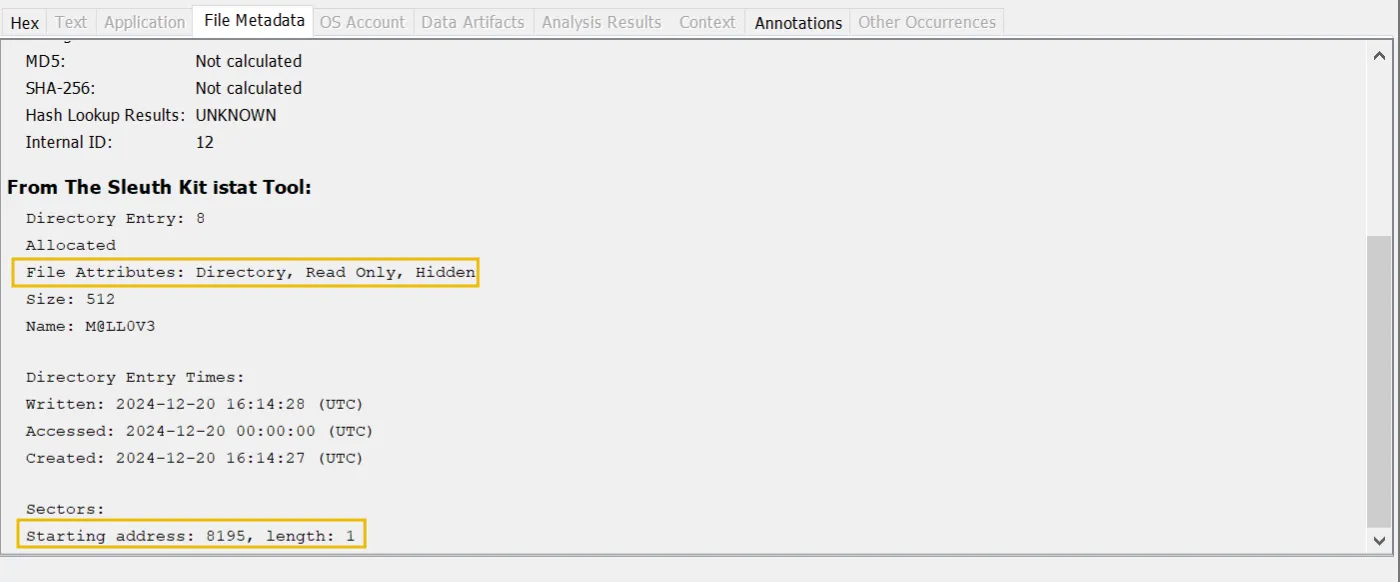
Hidden files & directories:
using autopsy , you will have an interface just like this ,
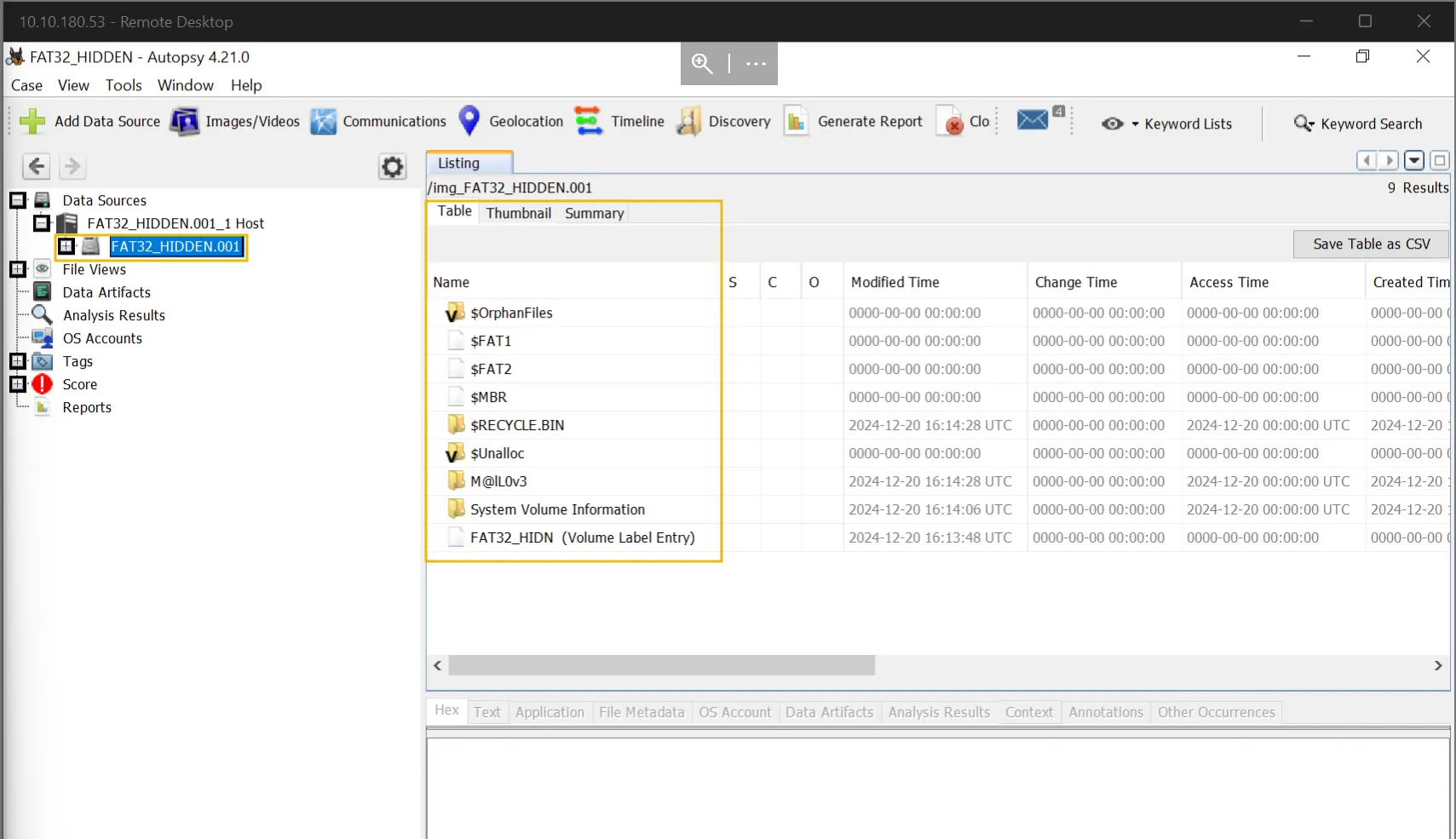
if you select a file you will access the bouton panel like hex , text if the file contain text , meta data , and so on
Change the timestamps:
Attackers often modify file timestamps— Creation Time , Modified Time , and Last Access Time—to hide malicious activity. By altering these values, they make malicious files appear legitimate or blend them with normal system files.
to detect it we we’ll use autopsy again navigating into the timeline tab
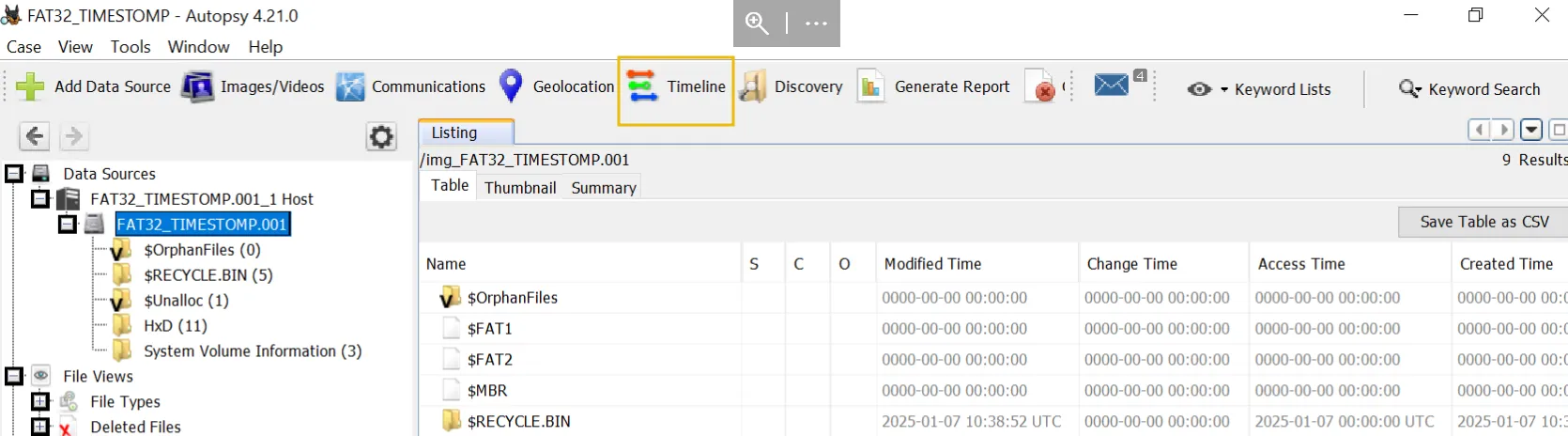
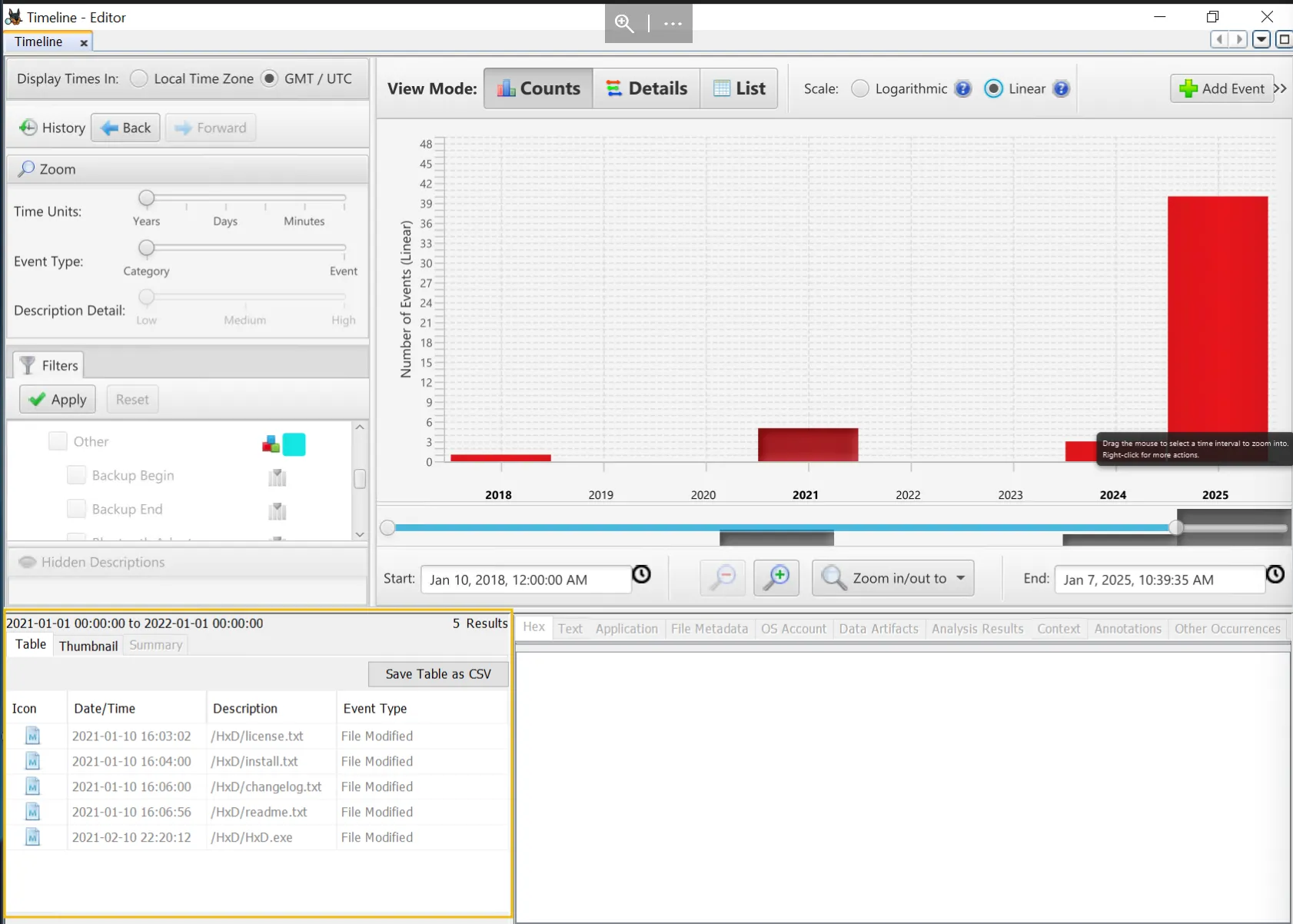
from here we can see a time line of all the files if we see small events in an order year this may indicate the file time stamp was altered , logically speaking the user will have all the files created in close time periods
Common Mistakes Attackers Make:
Illogical Timestamps:
Creation time later than Modified time: (impossible in normal operations). Timestamps older than the OS installation date (e.g., a file “created” in 1999 on a 2020 system).
Uniform Timestamps:
Multiple files with identical Creation/Modified times suggest bulk manipulation.
Mismatch with Logs:
Windows Event Logs (Event ID 4663 for file access) may show the real access time, conflicting with the altered timestamp.
File Deletion and Clear Persistence:
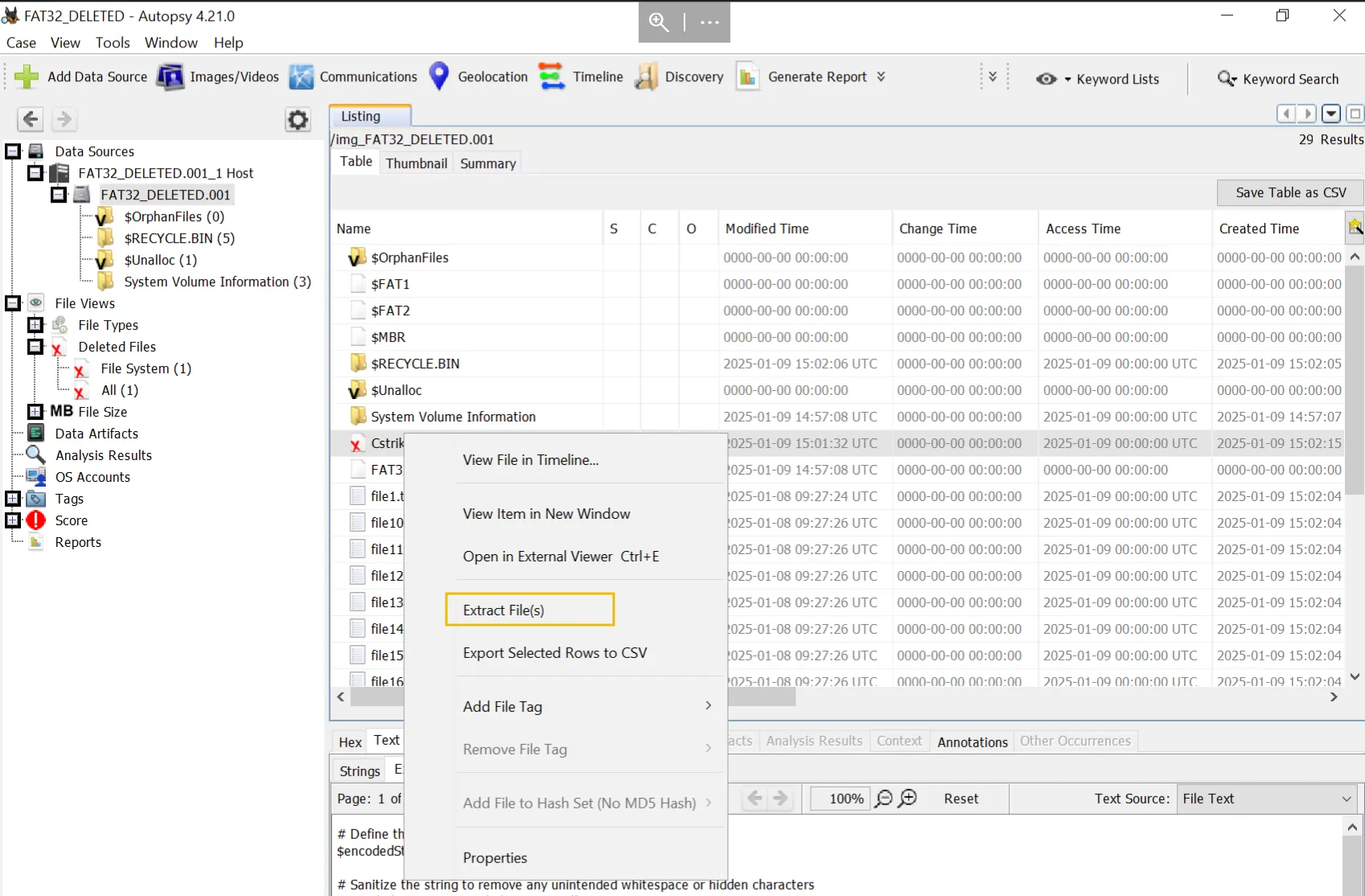
When attackers compromise a system, they often delete file or manipulate timestamps to hide their activity. On FAT32 file systems, forensic analysis can uncover these actions by examining: Deleted file entries (marked with 0xE5 in directory structures). FAT table clusters to recover file chains. Timestamp anomalies (e.g., creation/modified time mismatches).
yet again we will use my dude autopsy , thankfully it have some features that can help us like it reserving deleted items , having the recycle bin directory / and the deleted files tab