
MBR and GPT Analysis
MBR and GPT Analysis
The Boot Process:
Initiates when the system is powered on, starting hardware initialization, loading the operating system (OS) into memory, and enabling user interaction.
Key stages: Power-On → Firmware (BIOS/UEFI) → Power-On-Self-Test (POST) → Locate Bootable Device → MBR/GPT takes over.
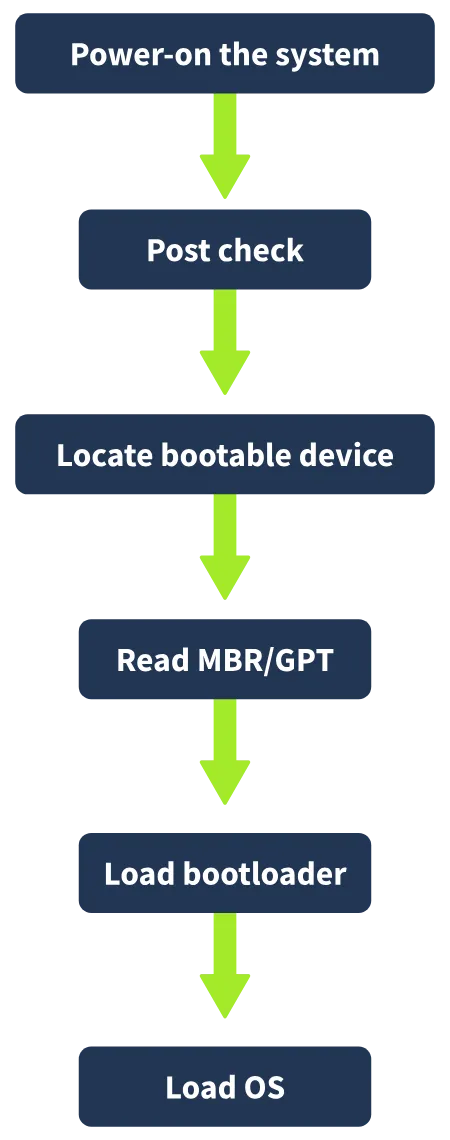
Power-On the System:
Pressing the power button sends electrical signals to the motherboard. First component activated is the cpu, fetches instructions from firmware (BIOS/UEFI) on the motherboard. Firmware: BIOS or UEFI provides initial instructions to start the boot process.
BIOS (Basic Input/Output System):
Legacy firmware, runs in 16-bit mode. Supports disks up to 2 terabytes. Compatible with MBR partitioning scheme.
UEFI (Unified Extensible Firmware Interface):
Modern replacement for BIOS, supports 32-bit and 64-bit modes. Supports disks up to 9 zettabytes. Features: Secure Boot (ensures boot integrity), redundancy (backup recovery for corrupted boot code). Compatible with GPT partitioning scheme.
Power-On-Self-Test (POST):
Executed by BIOS/UEFI to verify hardware functionality (e.g., CPU, RAM, keyboard).
Indicators: Beeps: Single or multiple beeps signal hardware status. Error messages displayed on screen (e.g., “Keyboard not found”).
Locate Bootable Device:
BIOS/UEFI searches for bootable devices (e.g., SSD, HDD, USB) with an installed OS. Once located, BIOS/UEFI reads the first sector of the device, which contains either: MBR (Master Boot Record): Used with BIOS. GPT (GUID Partition Table): Used with UEFI. MBR/GPT takes control of the boot process from this point.
Master Boot Record (MBR)
The Master Boot Record (MBR) is located in the first sector (512 bytes) of a bootable disk using the MBR partitioning scheme. Legacy Use: Widely used for decades, now largely replaced by GPT in modern systems but still relevant for some systems. Analysis Tool: Use a hexadecimal editor (e.g., HxD) to view the MBR
HxD:
MBR appears in hexadecimal format:
1- Byte Offset: Indicates position.
2-Hexadecimal Bytes: Actual MBR data.
3-ASCII Text: Converted hex to text.
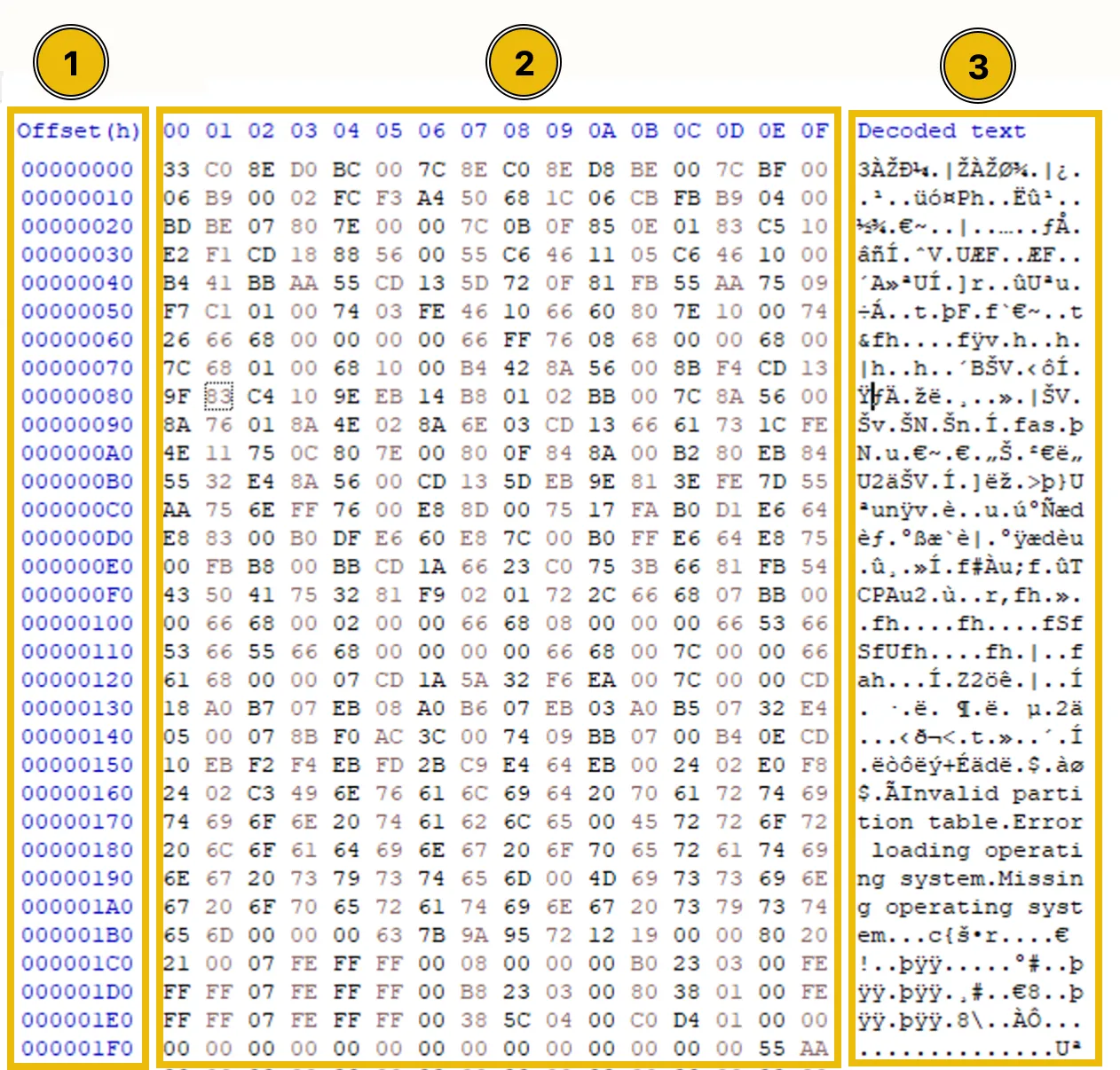
MBR Structure
512 bytes (first sector of the disk). 32 rows (16 bytes per row). MBR end signature is (55 AA) at bytes 510–511.
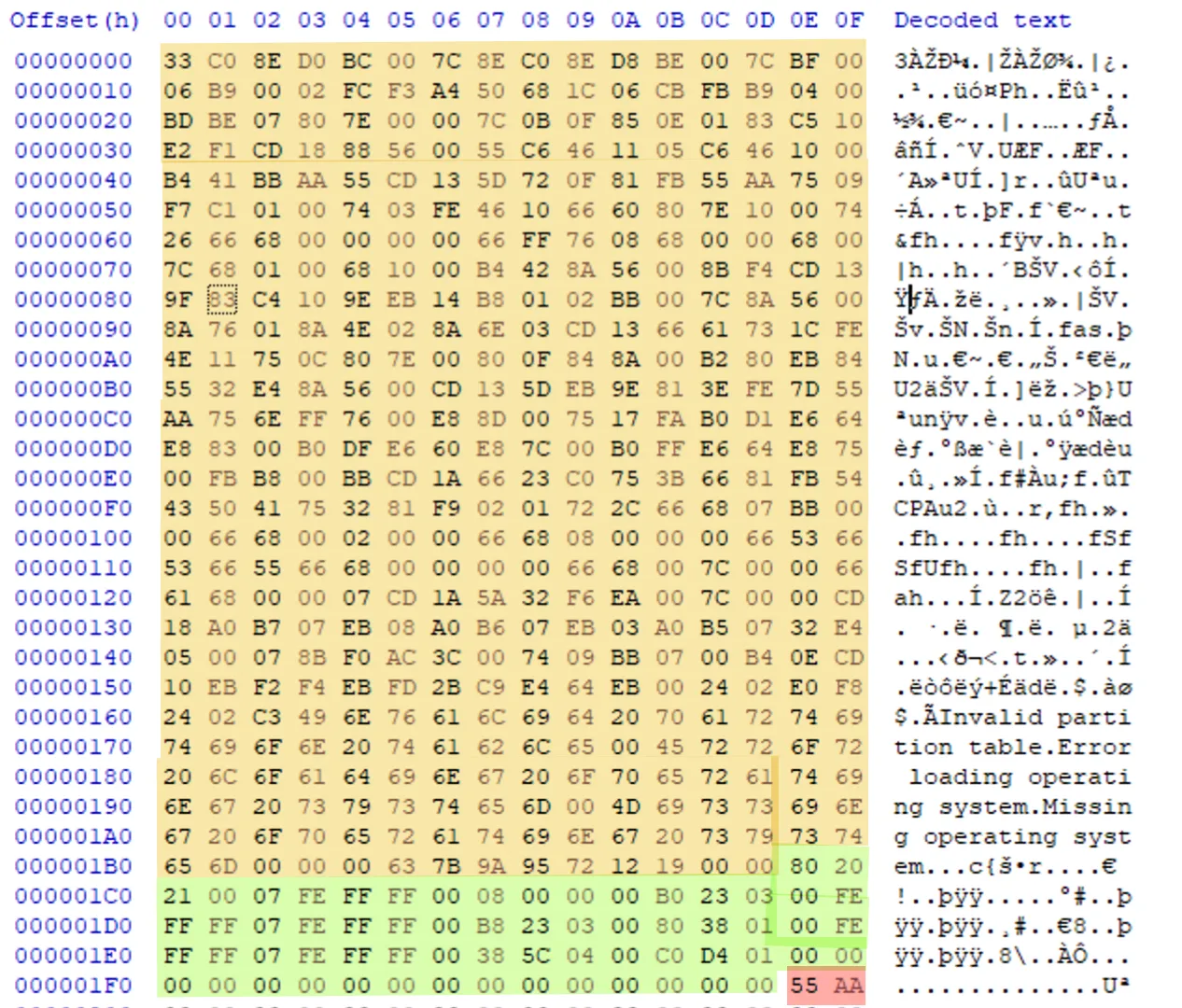
Bootloader Code (Bytes 0–445)
Contains the Initial Bootloader, the first code executed in the MBR. Searches the partition table to locate the bootable partition. Can be disassembled into assembly language for deeper analysis.
Partition Table (Bytes 446–509)
64 bytes, describing up to 4 partitions (16 bytes per partition).vvInitial bootloader identifies the bootable partition. Loads the second bootloader from the bootable partition, which then loads the OS kernel. Valuable for forensic analysis (e.g., partition details).
Partition Fields (Example: First partition, 16 bytes):
| Bytes Position | Bytes Length | Example Bytes | Field Name | Description |
|---|---|---|---|---|
| 0 | 1 | 80 | Boot Indicator | 80 = Bootable, 00 = Non-bootable (e.g., C: drive is typically bootable). |
| 1–3 | 3 | 20 21 00 | Starting CHS Address | Physical address (cylinder, head, sector); less relevant due to LBA. |
| 4 | 1 | 07 | Partition Type | Filesystem type (e.g., 07 = NTFS; see list for other types). |
| 5–7 | 3 | FE FF FF | Ending CHS Address | Physical end address; less relevant due to LBA. |
| 8–11 | 4 | 00 08 00 00 | Starting LBA Address | Logical address to locate partition start (little-endian). |
| 12–15 | 4 | 00 B0 23 03 | Number of Sectors | Total sectors in partition (little-endian). |
Key Fields for Forensics:
Boot Indicator: Identifies bootable partition.
Partition Type: Reveals filesystem (e.g., NTFS, FAT32).
Starting LBA Address: Locates partition start for data carving.
Number of Sectors: Calculates partition size.
Locating a Partition:
Example LBA: 00 08 00 00 (little-endian).
Steps:
Reverse to 00 00 08 00. Convert to decimal ,2048 . Multiply by sector size (512 bytes) = 1,048,576 bytes. In HxD, use Go to, 1,048,576 (decimal), and jump to partition start. Locate partition for data recovery or analysis of hidden/deleted partitions.
MBR Signature (Bytes 510–511)
55 AA (Magic Number). Marks the end of the MBR.
FTK Imager:
A forensic tool used to create, analyze, and examine disk images. Analyze an infected disk image preserved after an attack (booted via live USB to avoid altering evidence). The provided disk image shows an “Unrecognized file system” error in FTK Imager due to a corrupted MBR.
Captures forensic images of disks without altering data. Allows viewing of partitions, files, and metadata once the disk is accessible. Can inspect and repair the MBR to restore access to the file system.
GPT Partitioning Scheme and Boot Process:
GPT:
GUID Partition Table (GPT) is a modern disk partitioning scheme used with UEFI firmware, replacing the MBR (Master Boot Record).
Advantages over MBR: Supports disks up to 9 zettabytes (MBR: 2 terabytes). Supports up to 128 partitions (MBR: 4 partitions). Provides redundancy with backup GPT header and partition entry array.
Compatibility: Designed for UEFI firmware but includes a Protective MBR for legacy BIOS systems.
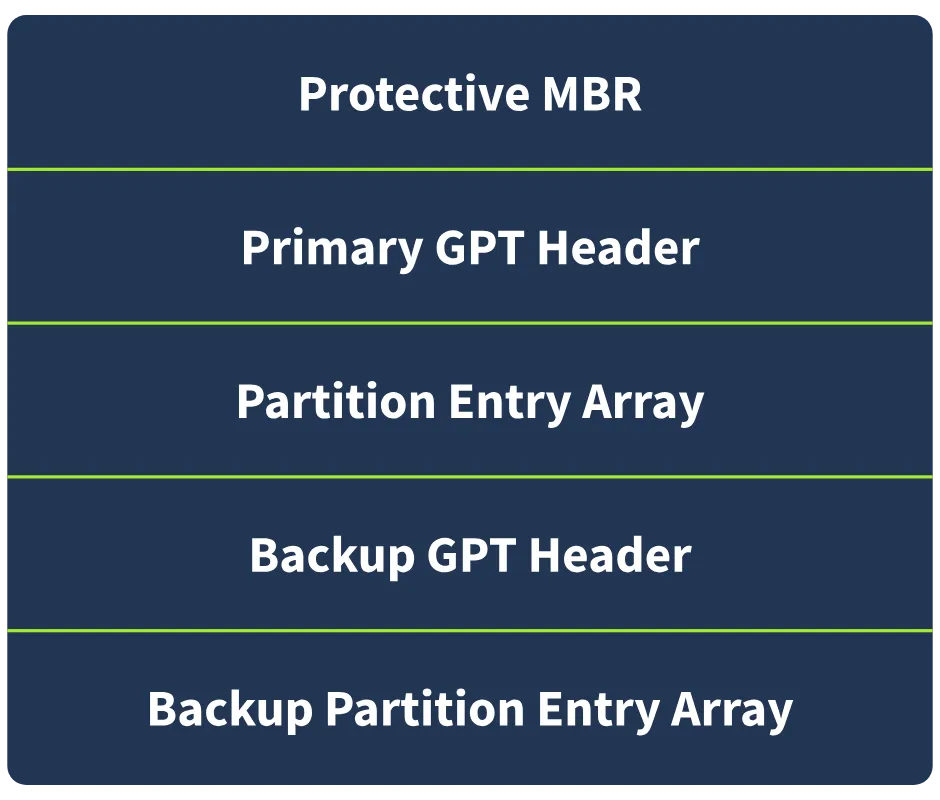
GPT Structure:
Components: Spread across multiple disk sectors (unlike MBR’s single sector).
- Protective MBR (Sector 0)
- Primary GPT Header (Sector 1)
- Partition Entry Array (Sector 2 onwards)
- Backup GPT Header (Last sector)
- Backup Partition Entry Array (Before Backup GPT Header)
Protective MBR (Sector 0, 512 bytes)
Ensures compatibility with legacy BIOS systems by mimicking an MBR, signaling that the disk uses GPT to prevent misinterpretation.
Components:
Bootloader Code (Bytes 0–445):
Non-functional, typically all 00s or placeholder code for legacy compatibility.Unlike MBR, it does not execute during the boot process
Partition Table (Bytes 446–509):
Contains one partition (16 bytes) to redirect to the EFI System Partition (ESP). Key byte: 4th byte = EE, indicating a GPT disk. Other partition slots are filled with 00s.
MBR Signature (Bytes 510–511):
Same as MBR: 55 AA, marking the end of the Protective MBR.
Primary GPT Header (Sector 1, 512 bytes, uses first 92 bytes)
Acts as a blueprint for the disk’s partition layout. First 92 bytes contain meaningful data; remaining bytes are 00 for padding.

-
Fields:
Bytes Position Bytes Length Example Bytes Field Name Description 0–7 8 45 46 49 20 50 41 52 54 Signature Identifies GPT header (always EFI PART). 8–11 4 00 00 01 00 Revision GPT version (e.g., 1.0). 12–15 4 5C 00 00 00 Header Size Size of GPT header (92 bytes, little-endian). 16–19 4 71 89 13 1C CRC32 of Header Checksum; tampering/corruption detection. 20–23 4 00 00 00 00 Reserved Reserved for future use. 24–31 8 01 00 00 00 00 00 00 00 Current LBA Location of this header (sector 1). 32–39 8 AF 32 CF 1D 00 00 00 00 Backup LBA Location of Backup GPT Header. 40–47 8 22 00 00 00 00 00 00 00 First Usable LBA First address for partitions. 48–55 8 8E 32 CF 1D 00 00 00 00 Last Usable LBA Last address for partitions. 56–71 16 1D F1 B0 D6 43 BE 37 4E … Disk GUID Unique disk identifier (e.g., 1DF1B0D6-43BE-374E-B1E6-3866ECB17389). 72–79 8 02 00 00 00 00 00 00 00 Partition Entry Array LBA Start of Partition Entry Array (sector 2). 80–83 4 80 00 00 00 Number of Partition Entries Total partitions (e.g., 128). 84–87 4 80 00 00 00 Size of Each Partition Entry Size of each entry (128 bytes). 88–91 4 41 0D C0 22 CRC32 of Partition Array Checksum for Partition Entry Array.
Partition Entry Array (Sector 2 onwards)”
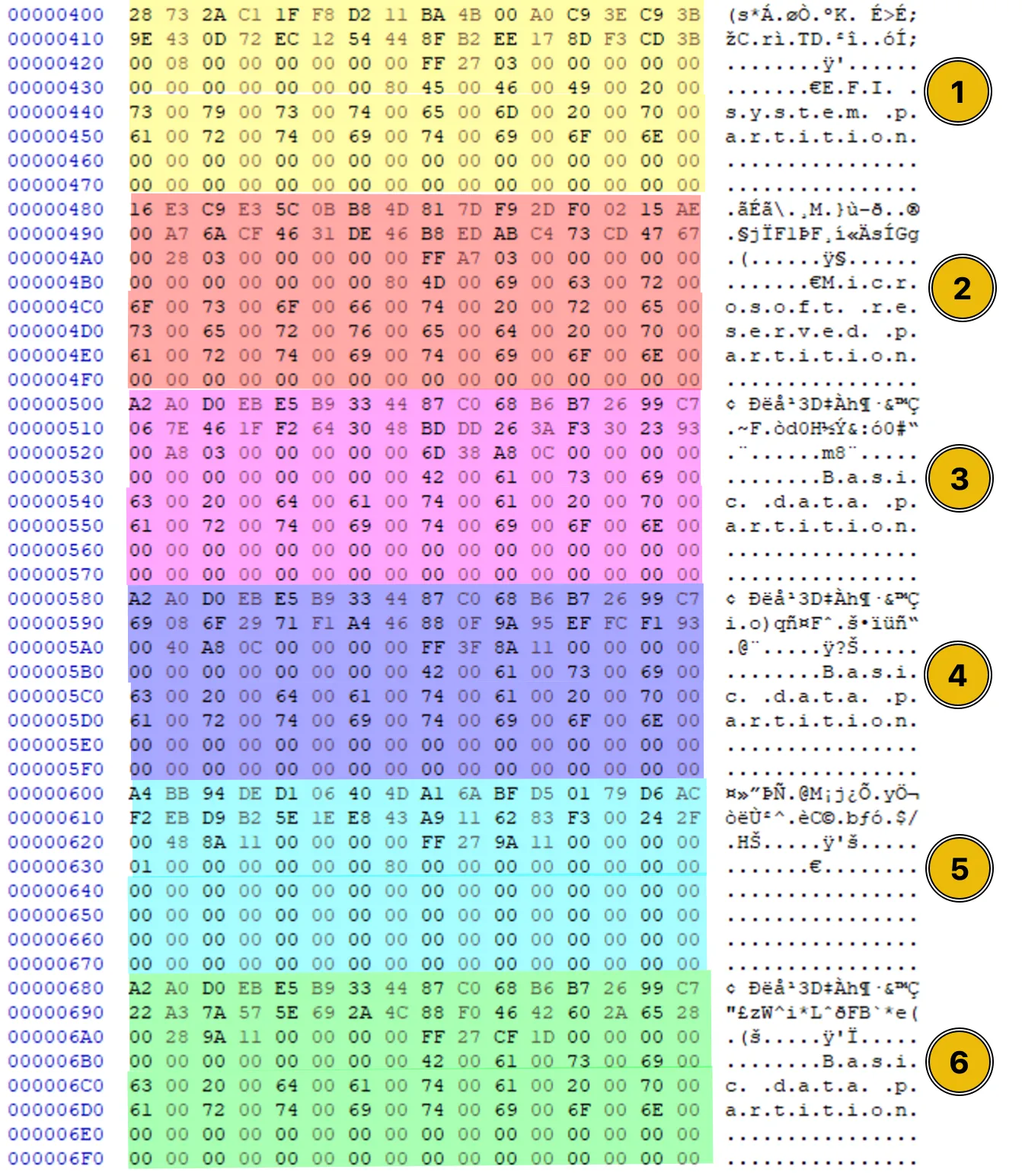
Stores details of up to 128 partitions (compared to MBR’s 4). Each partition entry is 128 bytes; only active partitions have non-zero values.
-
Example Partition Entry (First partition):
Bytes Position Bytes Length Example Bytes Field Name Description 0–15 16 28 73 2A C1 1F F8 D2 11 … Partition Type GUID Identifies partition type (e.g., EFI System Partition). 16–31 16 9E 43 0D 72 EC 12 54 44 … Unique Partition GUID Unique identifier for the partition. 32–39 8 00 08 00 00 00 00 00 00 Starting LBA Start of partition (little-endian). 40–47 8 FF 27 03 00 00 00 00 00 Ending LBA End of partition (little-endian). 48–55 8 00 00 00 00 00 00 00 80 Attributes Flags (e.g., bootable, hidden). 56–127 72 45 00 46 00 49 00 20 00 … Partition Name UTF-16 encoded name
Partition Type GUID: you can get it in HxD
Backup GPT Header (Last Sector)
Redundant copy of Primary GPT Header for recovery if the primary is corrupted. Identical to Primary GPT Header (same fields, values). Compare with Primary GPT Header to detect tampering or corruption.
Backup Partition Entry Array (Before Backup GPT Header)
Redundant copy of Partition Entry Array for recovery. Identical to primary Partition Entry Array. Use for recovery or validation if primary array is damaged.