
PE Headers
PE Headers
Portable Executable (PE) File Format:
A PE file is a binary executable format used by Windows to store and execute programs (e.g., .exe, .dll). On disk, appears as a sequence of bits (hex digits in a hex editor). Contains instructions and metadata needed by Windows to load and run the binary. Critical for malware analysis, as malicious code is often embedded in PE files.
Viewing PE Files:
Hex Editor: Displays raw hex data (e.g., random hex characters). Challenge: Manual interpretation is tedious due to complex structure. can use wxHexEditor.
PE Analysis Tool: Visualizes PE structure as a tree with dropdown menus for headers. can use pe-tree.
PE Headers:
Data Type: All headers are STRUCT (user-defined data type combining multiple fields). Documentation: Refer to MSDN for field definitions and data types.
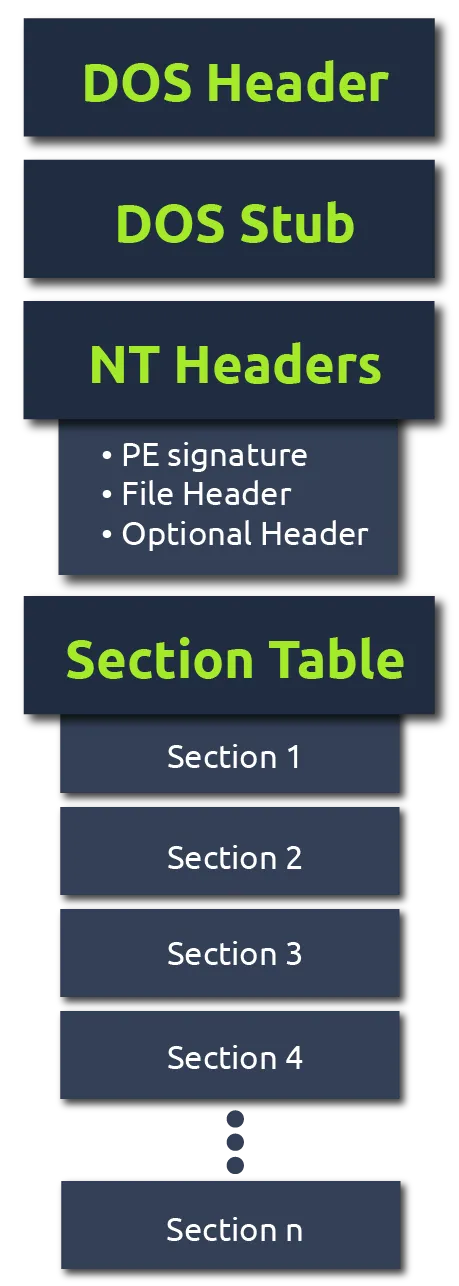
IMAGE_DOS_HEADER: Initial header; contains DOS compatibility stub and pointer to NT headers.
IMAGE_NT_HEADERS: Main header; includes signature, file header, and optional header.
FILE_HEADER: Describes file attributes (e.g., machine type, number of sections).
OPTIONAL_HEADER: Contains runtime info (e.g., entry point, image base address).
IMAGE_SECTION_HEADER: Defines sections (e.g., code, data) and their properties (size, permissions).
IMAGE_IMPORT_DESCRIPTOR: Lists imported DLLs and functions used by the executable.
Approach:
Understand the PE format, not just specific tools. Tools: wxHexEditor, pe-tree, or alternatives (e.g., PEiD, CFF Explorer) serve the same purpose.
IMAGE_DOS_HEADER:
The PE file starts with headers that define its structure and compatibility, beginning with the IMAGE_DOS_HEADER and DOS Stub. Ensures backward compatibility with MS-DOS and identifies the file as a Windows executable. Limited direct use in malware analysis but critical for understanding PE structure and detecting anomalies.
IMAGE_DOS_HEADER:
Definition: First 64 bytes of a PE file, containing metadata for compatibility and navigation.
- Key Fields:
e_magic:Marks the file as a Portable Executable. Initials of Mark Zbikowski, MS-DOS format architect.
e_lfanew: Offset to the IMAGE_NT_HEADERS. Points to the start of modern PE headers.
Malware Relevance: Rarely manipulated but checked to confirm valid PE format. Anomalous e_magic or e_lfanew may indicate tampering.
DOS Stub:
Small code segment following the IMAGE_DOS_HEADER, executed if the PE file runs in an incompatible environment (e.g., MS-DOS). Displays: “This program cannot be run in DOS mode.” Exits gracefully on unsupported systems.
Malware Relevance: Typically benign but can hide small malicious code in rare cases. Entropy analysis may reveal packing/obfuscation if unusually high.
IMAGE_NT_HEADERS:
Central header in the PE file, located at the offset specified by e_lfanew in the IMAGE_DOS_HEADER. Provides critical metadata for execution and is analyzed in malware reverse engineering to identify file properties and anomalies.
Components:
Signature: Marks the start of NT headers.
FILE_HEADER: Describes file metadata.
OPTIONAL_HEADER: Contains runtime details (covered in the next task).
Signature:
Identifies the start of the IMAGE_NT_HEADERS. Location: First 4 bytes at the e_lfanew offset
Malware Relevance: Validates PE format; invalid signatures may indicate corruption or obfuscation. Rarely manipulated but checked for integrity.
FILE_HEADER:
Contains metadata about the PE file’s structure and compatibility. Location: Immediately follows the Signature .
Key Fields:
| Field | Purpose |
|---|---|
| Machine | Specifies target architecture (e.g., 0x014C = i386, 32-bit Intel). |
| NumberOfSections | Number of sections in the PE file (e.g., code, data). |
| TimeDateStamp | Compilation timestamp of the binary. |
| PointerToSymbolTable | COFF-related; typically unused in PE files (often 0). |
| NumberOfSymbols | COFF-related; typically unused in PE files. |
| SizeOfOptionalHeader | Size of the OPTIONAL_HEADER in bytes. |
| Characteristics | Flags describing file properties (e.g., executable, 32-bit, stripped info). |
Malware Relevance:
Machine: Indicates if the binary targets 32-bit (i386) or 64-bit (x86_64, 0x8664). NumberOfSections: Unusual counts may suggest added malicious sections. TimeDateStamp: Fake or outdated timestamps can indicate tampering. Characteristics: Missing expected flags (e.g., executable) or unusual ones may reveal obfuscation.
OPTIONAL_HEADER:
Part of the IMAGE_NT_HEADERS, following the FILE_HEADER. Contains critical runtime information for loading and executing the PE file. Location: Starts immediately after the FILE_HEADER in the PE structure. Key for malware analysis due to fields like entry point, imports, and subsystem, which reveal execution behavior.
Key Fields
| Field | Purpose |
|---|---|
| Magic | Indicates architecture: 0x010B = 32-bit, 0x020B = 64-bit. |
| AddressOfEntryPoint | Relative Virtual Address (RVA) where execution begins (relative to ImageBase). |
| BaseOfCode | RVA of the code section (e.g., .text). |
| BaseOfData | RVA of the data section (e.g., .data). |
| ImageBase | Preferred memory load address (often 0x00400000 for .exe). |
| Subsystem | Required runtime environment (e.g., GUI, CUI). |
| DataDirectory | Points to import/export tables (e.g., Import Address Table, Export Address Table). |
Field Details:
Magic: Determines if the PE is 32-bit (0x010B) or 64-bit (0x020B).
AddressOfEntryPoint: RVA (offset from ImageBase) of the first instruction executed. Critical for tracing code flow in reverse engineering. Malware Use: Often points to malicious code; obfuscated entry points suggest packing.
BaseOfCode / BaseOfData: RVAs for code (.text) and data (.data) sections. Helps locate executable and variable regions.
ImageBase: Preferred load address in memory (e.g., 0x00400000 for .exe). Windows relocates if address is unavailable (using .reloc section).
Subsystem: Specifies runtime environment: 0x0002: Windows GUI (graphical apps). 0x0003: Windows CUI (console apps). Others: Native, POSIX, etc. (see MSDN).
DataDirectory: Array of pointers to data structures (e.g., imports, exports). Includes Import Address Table (IAT): Lists DLLs/functions used.
IMAGE_SECTION_HEADER:
Part of the PE file structure that describes each section (e.g., code, data, resources). Defines the location, size, and permissions of sections containing the PE file’s functional data. Critical for malware analysis, as sections reveal code, imports, and potential anomalies.
Common Sections
| Section | Purpose | Typical Permissions | Malware Relevance |
|---|---|---|---|
| .text | Executable code (entry point resides here) | Code, Execute, Read | Primary target for malicious code |
| .data | Initialized data (strings, variables) | Read, Write | May store malicious payloads |
| .rdata / .idata | Import tables (DLLs, APIs) | Read | Suspicious imports reveal intent |
| .ndata | Uninitialized data | Read, Write | Rare; unusual presence may indicate issue |
| .reloc | Relocation info for memory loading | Read | Used for address fixups; rarely malicious |
| .rsrc | Resources (icons, images, UI elements) | Read | May hide encrypted data or droppers |
Key Fields in IMAGE_SECTION_HEADER
Each section has its own header with metadata.
| Field | Purpose |
|---|---|
| VirtualAddress | Relative Virtual Address (RVA) of the section in memory (offset from ImageBase). |
| VirtualSize | Size of the section when loaded into memory. |
| SizeOfRawData | Size of the section on disk (before loading). |
| Characteristics | Permissions and attributes (e.g., Read, Write, Execute). |
IMAGE_IMPORT_DESCRIPTOR:
A structure in the PE file that lists the Windows APIs and Dynamic-Link Libraries (DLLs) imported by the executable.Specifies external functions the PE file needs to perform its tasks, leveraging Windows API code. Critical for malware analysis, as imports reveal potential behavior and intent.
Structure:
DLL Names: Libraries from which functions are imported (e.g., KERNEL32.dll, USER32.dll).
Functions: Specific APIs imported (e.g., WriteFile, RegCreateKeyExW).
OriginalFirstThunk / FirstThunk: Pointers to the Import Name Table (INT) and Import Address Table (IAT).Used by the OS to resolve function addresses at runtime.
Packed Executables:
A packed executable is compressed or obfuscated to hide its true code, unpacked at runtime. Malware uses packing to evade detection and complicate static analysis. Analyzing section headers and imports helps identify packing, guiding reverse engineering efforts.
Indicators of a Packed Executable
Using tools like pe-tree and pecheck, the following characteristics in the IMAGE_SECTION_HEADER and IMAGE_IMPORT_DESCRIPTOR suggest a packed PE file:
Unconventional Section Names: Sections lack standard names (e.g., .text, .data) or are empty/odd (e.g., blank, .xyz).
EXECUTE Permissions for Multiple Sections: Non-.text sections have EXECUTE permissions, unlike standard PE files where only .text is executable.
High Entropy: Sections show entropy close to 8 (max randomness), indicating compressed/encrypted data.
SizeOfRawData vs. Misc_VirtualSize: In packed sections, SizeOfRawData (disk size) is much smaller than Misc_VirtualSize (memory size) for sections with WRITE and EXECUTE.
Few Import Functions: Packed PE files import minimal functions, often just GetProcAddress, GetModuleHandleA, and LoadLibraryA.
Tools: pe-tree: GUI for visualizing section headers and imports.
python -m pe_tree Downloads\Challenge.exe
pecheck: CLI tool for detailed section info (e.g., entropy, permissions).
Check section names in IMAGE_SECTION_HEADER (empty or non-standard = suspect). Inspect Characteristics for EXECUTE in non-.text sections. Analyze entropy (values >7 suggest packing). Compare SizeOfRawData vs. Misc_VirtualSize for large discrepancies. Review IMAGE_IMPORT_DESCRIPTOR for minimal imports (e.g., LoadLibraryA).