
Static Analysis
Static Analysis
Virtual Machines:
provide a safe, isolated environment for analyzing malware, with snapshot capabilities to revert to a clean state.
Isolation: Prevents malware from affecting the host system or network. Snapshots: Save and restore a clean VM state with tools pre-installed. Flexibility: Supports various OS (Windows, Linux) and configurations.
Popular VM Software:
Oracle VirtualBox: Free, open-source, supports snapshots. VMware Workstation: Commercial, advanced snapshot and network features.
Steps for Malware Analysis Using VMs
Create a Fresh VM: Install a clean OS (e.g., Windows 10, Ubuntu).
Install Tools: Add analysis tools (e.g., disassemblers, debuggers, network monitors).
Take a Snapshot: Save the VM’s clean state with tools installed.
Analyze Malware: Copy malware samples into the VM for static/dynamic analysis.
Revert to Snapshot: Restore the VM to eliminate malware remnants.
Popular Malware Analysis VMs
FLARE VM:
Windows-based VM by Mandiant for malware analysis.
Key Features:
Pre-installed tools: IDA Free, Ghidra, PEiD, Process Monitor, Wireshark. Customizable: Add your own tools. Compatible with Windows 7 and 10 (Windows 10 preferred). Use Case: Dynamic/static analysis of Windows malware (.exe, .dll).
Resources:
- GitHub: https://github.com/mandiant/flare-vm
- Mandiant Blog: Setup guides and updates.
REMnux:
Linux-based distribution for reverse engineering and malware analysis, created by Lenny Zeltser.
Key Features:
Pre-installed tools: Radare2, Burp Suite, tcpdump. Lightweight, community-driven.
Use Case: Static analysis of malware, network forensics; not for dynamic analysis of Windows malware.
Resources:
- Website: https://remnux.org/
- GitHub: Additional scripts and documentation.
Safety Tips
Set VM network to “host-only” or “NAT” to prevent malware spread. Disable shared folders between host and VM. Update tools and VMs regularly for new malware techniques.
String Search
Examines binary data in a malware sample (any file type) to identify sequences of ASCII or Unicode characters followed by a null character. Reports these sequences as strings. Not all sequences are meaningful strings; some are memory addresses, assembly instructions, or random data, leading to False Positives (FPs). FPs: Appear as garbage in output; analysts must filter out irrelevant data to focus on useful strings.
What to Look for :
Indicators of Compromise (IOCs) and useful artifacts:
Windows Functions/APIs: E.g., SetWindowsHook, CreateProcess, InternetOpen. Indicate malware functionality.
IP Addresses, URLs, Domains: Suggest Command-and-Control (C2) communication. Example: WannaCry’s killswitch domain found via string search.
Miscellaneous: Bitcoin addresses, Message Box text, etc., provide context for analysis.
Basic String Search Tools:
Strings Utility:
Linux: Built-in strings command (used in Intro to Malware Analysis room).
Windows: strings.exe (Sysinternals suite).
Command: C:\Users\Administrator\Desktop>strings <path to binary>
Benefit: Dumps strings to a file for further analysis.
Details: Microsoft Documentation (Sysinternals suite).
Obfuscated Strings:
Malware authors obfuscate strings to evade basic string searches, hiding key information.
Solution: FLOSS (FireEye Labs Obfuscated String Solver) by Mandiant.
Deobfuscates and extracts strings missed by basic tools. Mandiant blog post on FLOSS functionality.
Command:
- Help:
C:\Users\Administrator\Desktop>floss -h - Run:
C:\Users\Administrator\Desktop>floss --no-static-strings <path to binary>
Hash Functions
Uniquely identify malware samples and differentiate them, as file names are unreliable (easily duplicated or changed).
How It Works:
Takes a file (arbitrary length) and generates a fixed-length hash based on content. Irreversible: Cannot recreate file content from the hash. Unique: Extremely low probability of two different files having the same hash (collision). Sensitive: Any content change (not file name) results in a different hash.
Common Hashing Methods:
MD5sum: Fast but insecure due to collision risks.
SHA1sum: More secure than MD5 but still vulnerable to collisions.
SHA256sum: Most secure, widely used for file hashing in malware analysis.
Identifying Similar Files Using Hashes
Imphash (Import Hash):
Hash of imported functions/libraries (from DLLs) and their order in a malware sample.
Identifies samples from the same threat group or with similar functionality.
https://www.mandiant.com/resources/blog/tracking-malware-import-hashing
https://bazaar.abuse.ch/browse.php?search=imphash%3A756fdea446bc618b4804509775306c0d
Fuzzy Hashes (SSDEEP):
Context Triggered Piecewise Hash (CTPH). Divides a file into pieces, hashes each piece, and identifies similar byte sequences across files. Detects similar malware samples even if the entire file differs. SSDEEP utility
Commands:
Help: C:\Users\Administrator\Desktop>ssdeep-2.14.1\ssdeep.exe -h
Calculate SSDEEP Hashes:
C:\Users\Administrator\Desktop>ssdeep-2.14.1\ssdeep.exe<file>
Find Matching Files:
C:\Users\Administrator\Desktop>ssdeep-2.14.1\ssdeep -l -r -d Incoming Outgoing Trash
- Options:
- d: Directory mode to compare files.
- r: Recursive mode for subdirectories.
- l: Use relative paths.
- Alternative Tool: CyberChef (Desktop > FLARE > Utilities > Cyberchef) can calculate SSDEEP hashes.
- Resource: SSDEEP documentation (https://ssdeep-project.github.io/ssdeep/).
Signature-based detection:
Patterns (e.g., byte sequences) in a file used to identify specific content, maliciousness, behavior, or malware family.
Purpose: Detect malicious files. Identify suspected behavior or malware family. Analyze patterns with or without context.
Types of Signatures
Yara Rules
Open-source, pattern-matching tool for malware researchers (“Swiss army knife”). Identifies binary and textual patterns (e.g., hexadecimal, strings) in files.
Usage: Use open-source Yara rule repositories from the security community. Apply rules to analyze malware, but verify context (some rules may hit non-malicious files).
Considerations: Check rule documentation for applicability. False Positives (FPs) possible; not all hits indicate malice.
https://github.com/Yara-Rules/rules
Proprietary Antivirus Signatures
Commercial signatures developed by antivirus (AV) companies.
Advantages: Lower FPs due to rigorous testing for commercial use. High confidence in identifying malicious files.
Limitations: Some False Negatives (FNs) when malicious files evade detection. Every AV product has FPs and FNs.
Usage: Use multiple AV products for a comprehensive verdict. VirusTotal: Scans files with 60+ AV vendors, provides signatures hit and file functionality hints. Best Practice: Search by file hash (not upload) for sensitive files to avoid leaking data or alerting attackers.
Capa (Mandiant Tool)
Open-source tool to identify capabilities in PE files based on signatures (e.g., imports, strings, mutexes). Maps behaviors to MITRE ATT&CK and Malware Behavior Catalog (MBC) frameworks.
-
Usage:
Command:
C:\Users\Administrator\Desktop>capa <file>Help:
C:\Users\Administrator\Desktop>capa -hOptions:
v: Verbose mode (shows match locations).vv: Very verbose mode (detailed addresses for capabilities).r <path>: Use custom rule set.t <tag>: Filter by rule meta fields (e.g., “create TCP socket”).j: Output in JSON format.
Interpretation:
Lists file hashes, ATT&CK/MBC mappings, and capabilities (e.g., RC4 encryption, file deletion).Indicates obfuscated stackstrings (suggests running FLOSS). Shows match counts (e.g., “write file (2 matches)”).
Resources:
GitHub: https://github.com/mandiant/capa
Mandiant blog: Capa introduction.
Default rules: https://github.com/fireeye/capa-rules
use PE headers // i have a page for this
↑basic
↓advance
Ghidra:
Free, open-source software reverse engineering tool for analyzing compiled code. Purpose: Understand software functionality through decompilation, disassembly, and debugging.
Why Use Ghidra?: Free and feature-rich compared to paid tools like IDA Pro. Ideal for learning reverse engineering and adaptable to other disassemblers (e.g., radare2, Cutter).
Key Features
Decompilation: Converts binaries to readable pseudo-C code.
Disassembly: Displays assembly language for low-level code analysis.
Debugging: Built-in debugger for stepping through code.
Analysis: Automatically identifies functions, variables, and code structures.
Ghidra Interface:
1- Program Trees: Shows program sections (e.g., .text, .data). Click to view content.
2- Symbol Tree:
Imports: Lists imported libraries/APIs (e.g., MessageBoxA).Exports: Shows exported functions (useful for DLLs).Functions: Lists functions, including entry (program start) and unnamed functions (FUN_VirtualAddress).
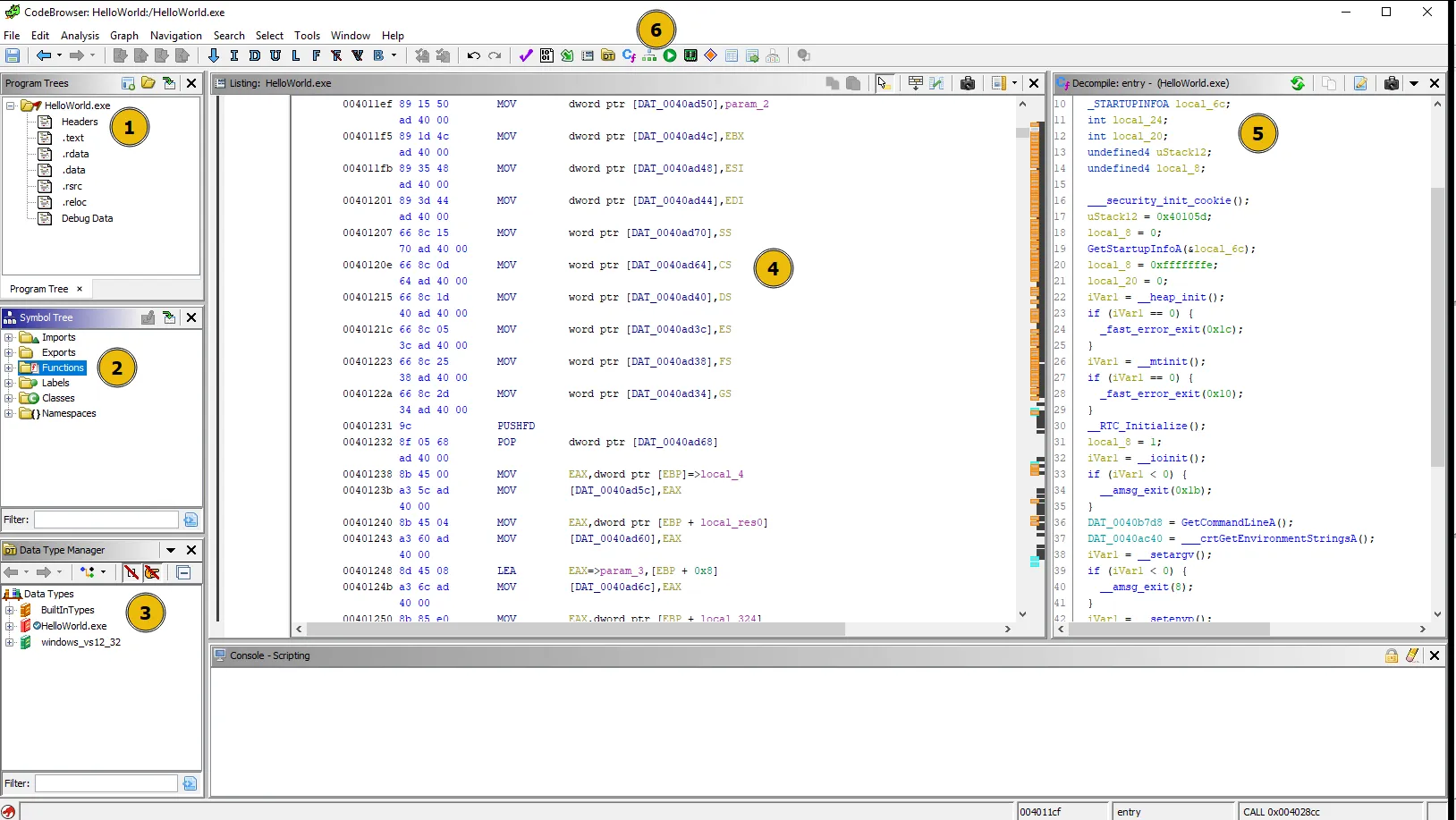
3- Data Type Manager: Displays data types found in the program.
4- Listing: Shows disassembled code with:
- Virtual Address, Opcode, Assembly Instruction (e.g., PUSH, CALL), Operands, Comments.
5- Decompile: Pseudo-C code translation of assembly.
6- Toolbar: Options for navigation, analysis, and visualization.
Graph View: Visualizes control flow (e.g., for if-else structures).
Memory Map: Shows memory layout of the program.
Strings Search: Lists strings for analysis (e.g., URLs, messages).
https://www.youtube.com/watch?v=oTD_ki86c9I
https://www.youtube.com/watch?v=u2vQapLAW88&t=142s
its important to know how basic programing concepts are written in c and assembly , i’ll not write it here you can easily google it.
Windows APIs and Malware Analysis
Malware heavily uses Windows APIs to achieve malicious goals. Analyzing import functions during advanced static analysis reveals malware capabilities. Use tools like Ghidra, PEstudio, or IDA Pro in FLARE VM to inspect imports and map APIs to behaviors.
Malware Categories and Associated Windows APIs
Keylogger:
Captures keystrokes to steal sensitive data (e.g., passwords, credit card numbers).
APIs:
- SetWindowsHookEx: Installs a hook to monitor keystrokes or mouse events.
- GetAsyncKeyState: Checks if a virtual key is pressed or released.
- GetKeyboardState: Retrieves status of all virtual keys.
- GetKeyNameText: Gets the name of a pressed key.
Downloader:
Downloads additional malware or updates, often disguised as legitimate software.
APIs:
- URLDownloadToFile: Downloads a file from the internet to a local file.
- WinHttpOpen: Initializes WinHTTP for HTTP connections to remote servers.
- WinHttpConnect: Establishes a connection to a remote server.
- WinHttpOpenRequest: Sends HTTP requests to download malicious code.
Command and Control (C2) Communication:
Communicates with a remote server to receive commands, send data, or download malware.
APIs:
- InternetOpen: Initializes an internet session for C2 communication.
- InternetOpenUrl: Opens a URL to download code or steal data.
- HttpOpenRequest: Opens an HTTP request to a C2 server.
- HttpSendRequest: Sends HTTP requests to send/receive data from a C2 server.
Data Exfiltration:
Unauthorized transfer of data to an external destination.
APIs:
- InternetReadFile: Reads data from an internet resource to steal data.
- FtpPutFile: Uploads stolen data to an FTP server.
- CreateFile: Reads/modifies files with sensitive data.
- WriteFile: Writes stolen data to a file for exfiltration.
- GetClipboardData: Retrieves sensitive data from the clipboard.
Dropper:
Installs other malware, often disguised as legitimate software.
APIs:
- CreateProcess: Launches a new process to execute malicious code.
- VirtualAlloc: Allocates memory to store malicious code.
- WriteProcessMemory: Writes malicious code to allocated memory.
API Hooking:
Intercepts and modifies Windows API calls to evade detection or alter behavior.
APIs:
- GetProcAddress: Locates addresses of exported functions for hooking.
- LoadLibrary: Loads a DLL to execute additional malicious code.
- SetWindowsHookEx: Installs hooks to monitor/modify API calls.
Anti-Debugging and VM Detection:
Evades analysis by detecting debuggers or virtualized environments.
APIs:
- IsDebuggerPresent: Checks if a process is being debugged.
- CheckRemoteDebuggerPresent: Detects remote debuggers.
- NtQueryInformationProcess: Retrieves process info to detect debugging.
- GetTickCount: Measures system uptime to detect virtual environments.
- GetModuleHandle: Checks for modules indicative of VMs.
- GetSystemMetrics: Retrieves system settings to detect virtualization.
Process Hollowing
A malware technique to inject malicious code into a legitimate process, replacing its memory space to evade detection. made to Bypasses security measures by executing malicious code within a trusted process. and Hides malicious activity under the guise of a legitimate process (e.g., svchost.exe). Analyze process hollowing in advanced static analysis using tools like Ghidra or PEstudio to identify relevant Windows APIs.
How it Works:
Create a New Process: Launches a legitimate process (e.g., notepad.exe) in a suspended state to serve as the hollowing target. API: CreateProcessA()
Suspend the Process: Pauses the process to allow memory manipulation. API: NtSuspendProcess()
Allocate Memory: Allocates memory in the suspended process to hold malicious code. API: VirtualAllocEx()
Write Malicious Code: Writes the malicious code into the allocated memory. API: WriteProcessMemory()
Modify Entry Point: Changes the process’s entry point to the malicious code’s memory address. APIs: SetThreadContext(), GetThreadContext()
Resume Process: Resumes the process, executing the injected malicious code. API: NtResumeProcess()
Clean Up: Releases resources and terminates any unnecessary processes to avoid detection.