
Windows Internals
Windows Internals
Processes:
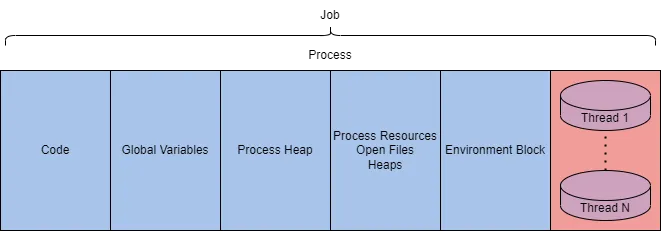
A process represents the execution of a program; an application may spawn one or more processes. Core to Windows functionality, encapsulating application execution. A process includes Virtual address space, executable code, open handles, security context, unique process ID, environment variables, priority class, min/max working set sizes, and at least one thread.
Process Characteristics:
| Component | Purpose |
|---|---|
| Private Virtual Address Space | Allocated virtual memory addresses for the process. |
| Executable Program | Code and data stored in the virtual address space. |
| Open Handles | Handles to system resources accessible by the process. |
| Security Context | Access token defining user, security groups, privileges, and security info. |
| Process ID (PID) | Unique numerical identifier for the process. |
| Threads | Units of execution within the process, scheduled by the CPU. |
Process in Memory (Low-Level View):
| Component | Purpose |
|---|---|
| Code | Executable instructions for the process. |
| Global Variables | Stored variables used across the process. |
| Process Heap | Dynamic memory allocation for data. |
| Process Resources | Additional resources (e.g., files, sockets) used. |
| Environment Block | Data structure with process metadata (e.g., env vars). |
Process Details in Task Manager:
| Value/Component | Purpose | Example |
|---|---|---|
| Name | Name of the process, typically from the application. | conhost.exe |
| PID | Unique identifier for the process. | 7408 |
| Status | Current state (e.g., running, suspended). | Running |
| User Name | User account running the process (indicates privilege level). | SYSTEM |
- Tools for Process Analysis: Process Hacker 2, Process Explorer, Procmon.
Threads:
A thread is the smallest executable unit within a process, responsible for controlling the process’s execution. Scheduled by the OS based on device factors (e.g., CPU, memory, priority). Threads “drive” process execution.
Characteristics
Shared Resources: Threads inherit resources from their parent process, including: Code, Global variables, Process heap, Open handles
Unique Components: Each thread maintains its own data and state.
| Component | Purpose |
|---|---|
| Stack | Stores thread-specific data (e.g., procedure calls, exceptions, local vars). |
| Thread Local Storage (TLS) | Pointers for allocating unique data environments per thread. |
| Stack Argument | Unique value assigned to each thread (e.g., for function parameters). |
| Context Structure | Holds machine register values (e.g., EAX, ESP) managed by the kernel. |
Virtual Memory:
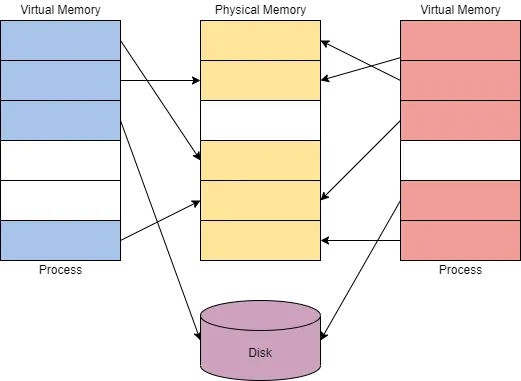
Virtual memory allows processes to interact with memory as if it were physical, preventing application collisions. Provides a private, isolated memory environment for each process, enhancing stability and security. Critical for understanding Windows internals and how malware manipulates memory.
Components:
Private Virtual Address Space: Each process gets its own virtual address space, isolated from others. Prevents processes from interfering with each other’s memory.
Memory Manager: Translates virtual addresses to physical addresses. Manages memory allocation and access.
Paging: When virtual memory exceeds physical memory, the memory manager transfers (pages) data to disk (swap file). Ensures efficient memory use across applications.
Space Limits:
32-bit Systems:
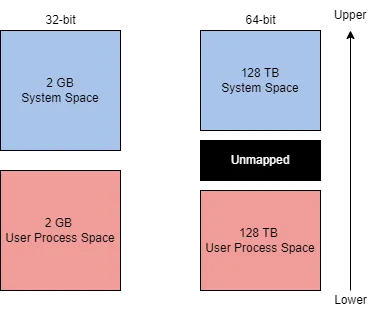
Maximum: 4 GB theoretical virtual address space. Allocation: Lower half (0x00000000 - 0x7FFFFFFF): Process address space (user mode). Upper half (0x80000000 - 0xFFFFFFFF): OS memory (kernel mode). Administrators can adjust allocation via increaseUserVA . AWE (Address Windowing Extensions): Allows apps to access more physical memory.
64-bit Systems:
Maximum: 256 TB theoretical virtual address space. Same ratio as 32-bit (user vs. kernel split). Larger space reduces need for AWE or custom settings.
Relevance to Malware
Abuse Potential: Malware can exploit virtual memory to: Inject code into a process’s private address space (e.g., process injection). Manipulate memory mappings to hide malicious data. Overwrite critical memory regions (e.g., via buffer overflows).
Dynamic-Link Libraries (DLLs):
Definition (Microsoft Docs): A DLL is a library containing code and data that multiple programs can use simultaneously. Purpose: Promotes code modularization and reuse. Enhances memory efficiency and reduces disk space. Speeds up program and OS loading/execution. Role: Core to Windows application execution, often loaded as dependencies.
DLL Creation
Structure: Similar to other applications but with specific syntax for export/import.
Header File (e.g., sampleDLL.h): Defines exported/imported functions (dllexport/dllimport). Critical for load-time linking; less relevant for run-time linking.
DLL Loading Mechanisms
- Load-Time Dynamic Linking:
Method: Application explicitly calls DLL functions at compile time.
Requirements: Header file (.h) to declare functions. Import library (.lib) to link DLL.
Use Case: Standard for legitimate apps with known dependencies.
- Run-Time Dynamic Linking:
Method: DLL loaded at runtime using API calls (LoadLibrary/LoadLibraryEx).
Steps: Load DLL with LoadLibrary. Get function address with GetProcAddress. Call function dynamically. Unload DLL with FreeLibrary.
Use Case: Flexible for dynamic or malicious code loading.
Malware Relevance
- DLL as Targets:
- DLLs are dependencies, making them attractive for attackers to manipulate program execution.
- Attack Vectors:
- DLL Hijacking (T1574.001): Replacing a legitimate DLL with a malicious one.
- DLL Side-Loading (T1574.002): Tricking a program into loading a malicious DLL.
- DLL Injection (T1055.001): Forcing a process to load a malicious DLL.
- Preference for Run-Time Linking:
- Malware favors LoadLibrary/GetProcAddress because:
- Avoids need for header/import files.
- Easier to transfer/load DLLs in memory.
- Enables dynamic, stealthy execution.
- Malware favors LoadLibrary/GetProcAddress because:
Portable Executable (PE):
PE format defines the structure for Windows executables (.exe, .dll) and object files, combining PE and COFF (Common Object File Format) specifications. it Organizes executable code, data, and metadata for Windows to load and run programs. Essential for malware analysis, as malicious code is embedded in PE files, and headers/sections reveal behavior.
Viewing PE Data:
Hex Dump: Displays raw binary as hex (e.g., calc.exe in a hex editor). Appears as a sequence of hex bytes (e.g., 4D 5A for DOS header). Manual analysis is complex due to structural intricacy. Tools: Tools like wxHexEditor (raw hex) or pe-tree (parsed headers) simplify analysis.
PE Structure Components:
The PE format is divided into headers and sections, each with a specific role.
DOS Header:
Identifies file as .exe and points to newer headers. Starts with MZ (4D 5A in hex).
DOS Stub:
Legacy code for DOS compatibility; prints “This program cannot be run in DOS mode.” Non-functional for modern Windows; ignored in execution.
PE File Header:
Defines file format, includes signature (PE\0\0), and sub-headers: IMAGE_FILE_HEADER: File metadata (machine type, section count). IMAGE_OPTIONAL_HEADER: Runtime info (entry point, image base). Least human-readable; parsed by tools like pe-tree.
Image Optional Header:
Contains critical runtime data (e.g., entry point, base address). Data directories pointing to structures like imports/exports. Misleading name; it’s mandatory for execution.
Data Dictionaries:
Part of Optional Header; pointers to data structures (e.g., imports, relocations).
Section Table:
Defines sections (e.g., code, data) and their attributes (size, permissions). .text, .rdata, .data define section names and sizes.
Sections:
Store actual file contents (code, data, resources).
| Section | Purpose |
|---|---|
| .text | Executable code and entry point. |
| .data | Initialized data (strings, variables). |
| .rdata / .idata | Imports (APIs, DLLs). |
| .reloc | Relocation info for address fixups. |
| .rsrc | Resources (e.g., images, dialogs). |
| .debug | Debug information (optional). |
Malware Analysis Context:
Why Analyze PE Structure?: Reveals malicious behavior (e.g., suspicious imports like LoadLibrary). Detects anomalies (e.g., unusual section names, executable .data sections). Traces execution flow via entry point (Optional Header).
Key Areas to Check: Imports (IMAGE_IMPORT_DESCRIPTOR): Look for APIs tied to injection (CreateProcess, VirtualAlloc). Sections: Check for odd permissions (e.g., writable .text) or padding with NOPs. Entry Point: Start of malicious code execution.
Interacting with Windows Internals:
The Windows API (primarily Win32, occasionally Win64) provides native functions to interact with Windows OS components. Simplifies access to Windows internals (e.g., memory, processes, hardware) without direct kernel manipulation. Widely used by applications and malware to control system behavior, making it critical for reverse engineering.
Windows Kernel: Manages all programs, processes, and hardware-software interactions. Controls memory access, a core aspect of Windows internals.
Processor Modes:
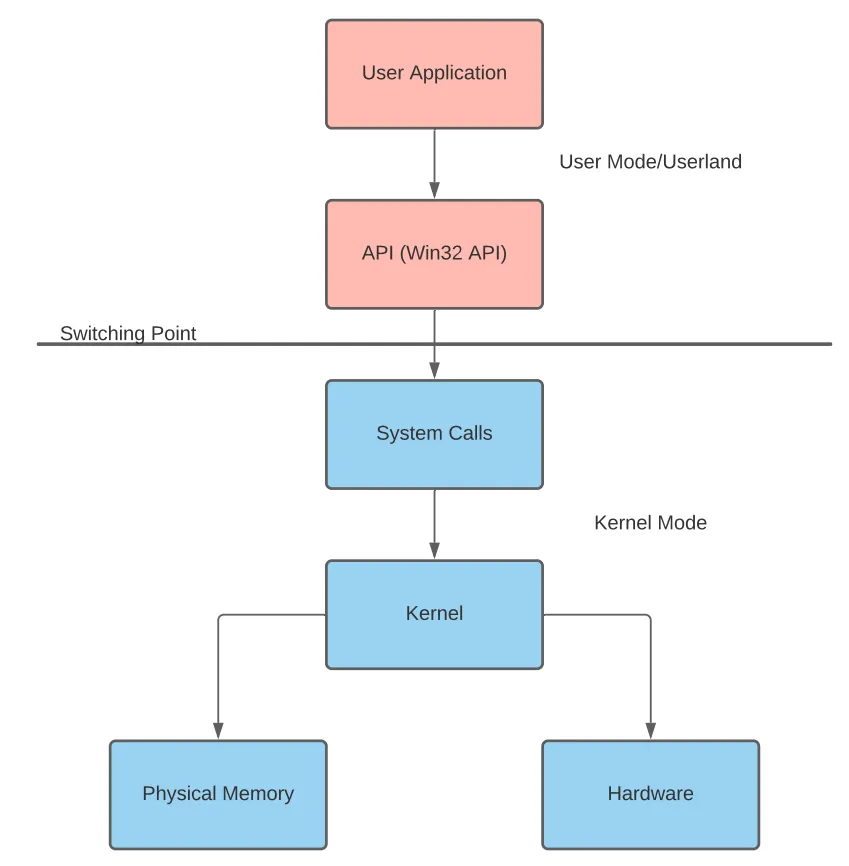
User Mode: No direct hardware access. Runs processes in private virtual address spaces. Limited to owned memory locations.
Kernel Mode: Direct hardware access. Operates in a shared virtual address space. Full access to physical memory.
Mode Switching: Facilitated by system calls or API calls (referred to as the “Switching Point”). Example: A user-mode app calls a Win32 API, which triggers a kernel-mode operation.
Language Runtimes: Languages like C# interact with the Win32 API via runtimes (e.g., CLR), adding a layer before system calls.
Malware Relevance:
API Abuse: APIs like VirtualAllocEx, WriteProcessMemory, and CreateRemoteThread are commonly used for process injection (T1055). Malware injects code into legitimate processes to evade detection.
Analysis Focus: Look for these APIs in disassembled code to identify injection attempts. Check allocated memory permissions (e.g., RWX for executable code).
Switching Modes: Malware often triggers kernel-mode operations via APIs to manipulate memory or hardware covertly.
https://muhammed-hatem.gitbook.io/muhammed-hatem/summaries/core-windows-processes