SOC L1 Alert Triage
SOC L1 Alert Triage
Below is an updated version of the SOC L1 Alert Triage notes for your Notion, with all questions and answers removed. This focuses solely on the key concepts, processes, and takeaways.
SOC L1 Alert Triage Notes
Task 1: Introduction
- Purpose: Entry-level training for SOC L1 analysts to understand and handle alerts, ensuring timely detection of security breaches.
- Learning Objectives:
- Understand SOC alerts and their lifecycle (generation to resolution).
- Explore alert fields, statuses, and classifications.
- Learn alert triage as an L1 analyst.
- Practice with real alerts and SOC workflows.
- Prepare for SOC Simulator and SAL1 certification.
- Prerequisites:
- Knowledge of common attacks (networks, Windows, Linux).
- Familiarity with SOC roles, especially L1 duties.
- SOC Dashboard: Access via TryHackMe SIEM (link: https://static-labs.tryhackme.cloud/apps/socl1-alerttriage/).
Task 2: Events and Alerts
- Overview: Alerts (e.g., “Email Marked as Phishing,” “Unusual Gmail Login Location,” “Unapproved Mimikatz Usage”) indicate potential threats in SIEM/EDR systems.
- L1 Role in Alert Triage:
- L1 Analysts: First responders; review alerts, classify (good/bad), escalate real threats to L2.
- L2 Analysts: Deeper analysis and remediation of escalated alerts.
- SOC Engineers: Ensure alerts have sufficient triage info.
- SOC Manager: Monitors triage speed/quality to prevent missed attacks.
Task 3: Alert Properties
- Key Properties:
- Verdict (e.g., True/False Positive).
- Affected user, hostname, or system.
- Alert details (description, indicators).
Task 4: Alert Prioritization
- Purpose: Decide which alerts to tackle first to ensure timely threat detection.
- Prioritization Rules:
- Filter Alerts: Take only new, unresolved alerts (avoid duplicates).
- Sort by Severity: Critical > High > Medium > Low (critical alerts likely indicate major threats).
- Sort by Time: Oldest first (older breaches may be more advanced).
- Action: Assign to first-priority alert (Critical severity, oldest), change status to “In Progress.”
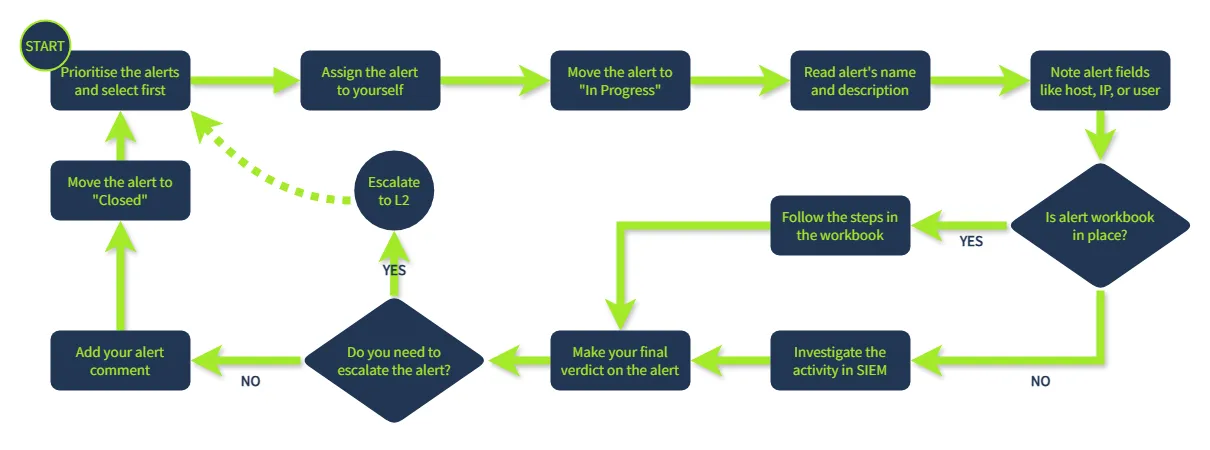
Task 5: Alert Triage
- Process (aka alert handling/investigation/analysis):
- Initial Actions:
- Assign alert to yourself, set status to “In Progress.”
- Review alert details (name, description, indicators).
- Investigation:
- Identify affected entity (user, hostname, etc.).
- Note alert action (e.g., login, malware, phishing).
- Check surrounding events for context.
- Use threat intelligence to verify findings.
- Use Workbooks/Playbooks if available (guides for specific alert types).
- Final Actions:
- Classify: True Positive (malicious) or False Positive (benign).
- Document analysis steps and reasoning in a comment.
- Close alert in dashboard.
- Initial Actions:
- Dashboard Notes:
- If no flag appears, values may be incorrect.
- Reset dashboard via “Restart” in TryHackMe SIEM.