
Endpoint Detection and Response
Endpoint Detection and Response
ERD
Endpoint Detection and Response (EDR) is a proactive security solution that monitors, detects, and responds to threats on endpoints (e.g., laptops, servers) in near real-time.Goes beyond perimeter defense by focusing on endpoint visibility, threat detection, and automated response.
Functions:
Monitor & Collect: Gathers endpoint activity data (e.g., network events, processes) that might signal threats.
Analyze: Identifies threat patterns using rules and analytics.
Respond: Automatically contains or removes threats (e.g., isolate host, delete files) and alerts security teams.
Forensics: Provides tools to investigate threats and search for suspicious activities.
How is Works:
Endpoint Data Recording:
- Data Types: Network traffic, process executions, file activities, commands, user actions, telemetry.
- Storage: On endpoints, servers, or hybrid setups.
Investigation & Response:
- Sweeping: Searches for Indicators of Compromise (IoCs) to assess impact.
- Root Cause Analysis: Identifies origins of threats for remediation.
- Threat Hunting: Uses behavior rules or threat intelligence (manual or automated).
Components :
Detection: Flags suspicious activities (e.g., malicious files) using threat intelligence. Effectiveness depends on quality of intelligence sources.
Response/Containment: Features: Host isolation, file cleanup, sandboxing, automated responses based on rules.
Integration: Works with existing security tools to enhance endpoint visibility.
Insights: Real-time analysis with AI/ML for behavioral threat mapping (e.g., MITRE ATT&CK framework).
Forensics: Investigates past threats, builds timelines, and uncovers hidden threats.
Event Tracing for Windows (ETW):
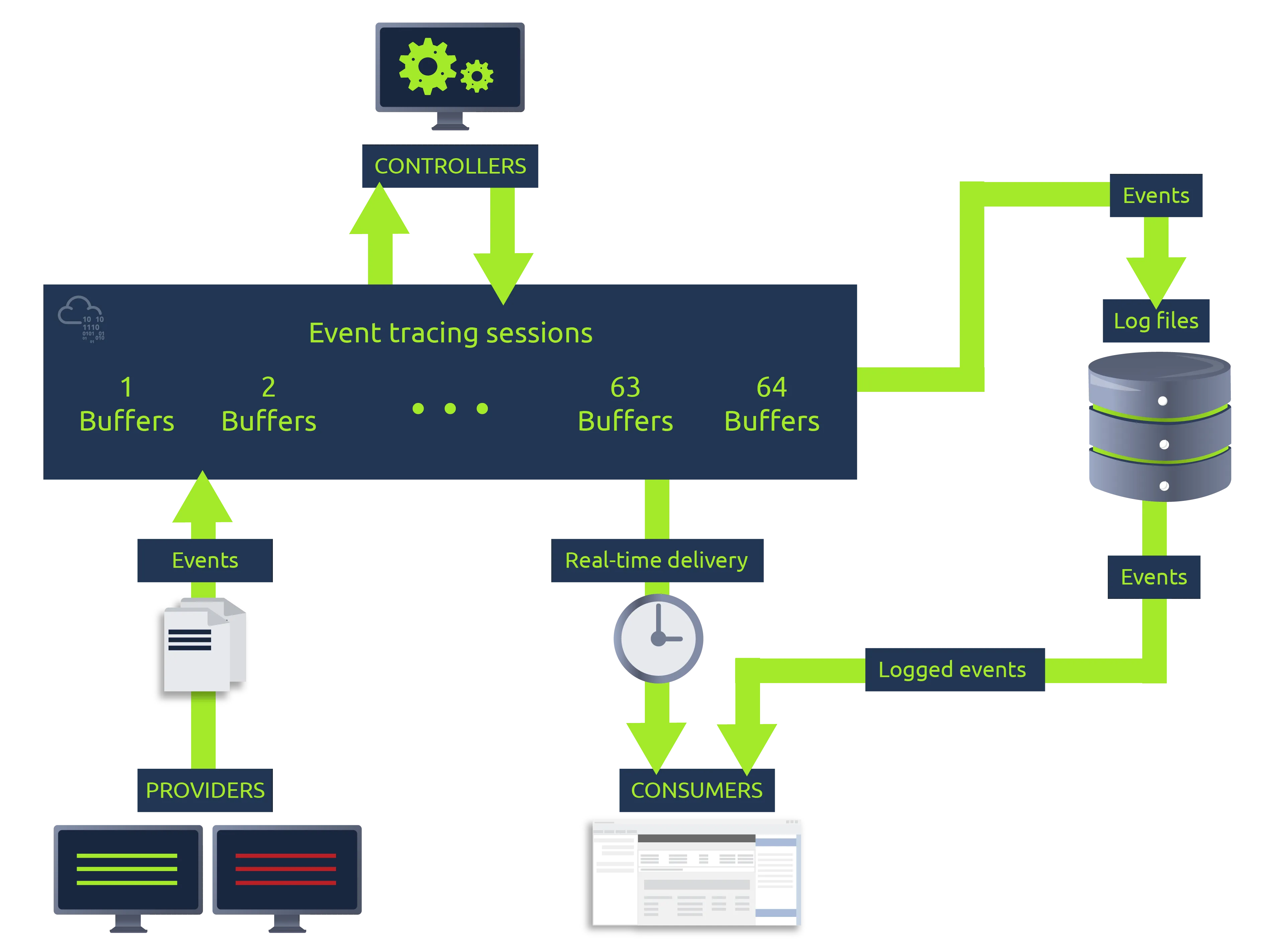
A Windows OS logging feature that traces and logs events from user-mode applications and kernel-mode drivers. Provides detailed event data for troubleshooting and cybersecurity detection. Vital for defenders as a source of telemetry for threat detection.
Components:
Controllers: Configure tracing sessions and activate providers. like logman.exe.
Providers: Applications or drivers that generate event logs.
Consumers: Applications that read events in real-time or from log files.
Windows Event Viewer:
A built-in Windows tool to view and analyze event logs from systems and applications. Troubleshoot issues and monitor activities (e.g., security events, system errors).
Event Log Levels:
Information: Successful operations (e.g., service running normally).
Warning: Potential future issues (not immediate problems).
Error: Significant issues with apps or services.
Success Audit: Successful security operations (e.g., user login).
Failure Audit: Failed security operations (e.g., denied network access).
Key Event Log Categories
Application:
- Logs related to system components (e.g., drivers, app interfaces).
- Focus: Aurora (mentioned later) logs events here.
System:
- Logs events from installed programs and OS activities.
Security:
- Logs security-related events (e.g., logins, resource access).
Using the Event Viewer
Access: Search “Event Viewer” in the Start menu.
Interface:
- Displays logs in a table: Level, Date/Time, Source, Event ID, Task Category.
- General Tab: Basic event details.
- Details Tab: In-depth event data.
Role for Analysts: Comb through logs to monitor system health and investigate incidents.
Aurora:
https://aurora-agent-manual.nextron-systems.com/en/latest/index.html
A Windows endpoint agent that uses Sigma rules and Indicators of Compromise (IOCs) to detect threats in local event streams via Event Tracing for Windows (ETW).it Monitors endpoints, triggers response actions for true-positive rule matches, and logs them in the Windows Event Viewer. On-premises tool, customizable with Sigma rules, no data leaves the network.
Versions of Aurora
Aurora (Enterprise):
- Sigma-based ETW event matching.
- Open-source rule set (1300+ rules) + Nextron’s proprietary Sigma rules.
- Open-source IOC set + Nextron’s IOC set.
- Output: Eventlog, File, UDP/TCP.
- Extras: ASGARD management, additional detection modules, unlimited response actions, rule encryption.
Aurora Lite (Free Community):
- Sigma-based ETW event matching.
- Open-source rule set (1300+ rules) only.
- Open-source IOC set only.
- Output: Eventlog, File, UDP/TCP.
- No advanced features like ASGARD or encryption.
Aurora Presets
Define how Aurora fetches events and raises alerts with varying levels of severity and resource use.
Four Presets:
- Standard: Medium severity events, balanced monitoring.
- Reduced: High severity events, lighter resource use.
- Minimal: High severity events, minimal resource impact.
- Intense: Low severity events, comprehensive monitoring.
| Setting | Standard | Reduced | Minimal | Intense |
|---|---|---|---|---|
| Deactivated Sources | Registry, Raw Disk, Kernel Handles, Create Remote Thread | Registry, Raw Disk, Process Access | Registry, Raw Disk, Kernel Handles, Create Remote Thread, Process Access, Image Loads | None |
| CPU Limit | 35% | 30% | 20% | 100% |
| Process Priority | Normal | Normal | Low | Normal |
| Min Reporting Level | Medium | High | High | Low |
| Deactivated Modules | None | LSASS Dump Detector | LSASS Dump Detector, BeaconHunter | None |
Running Aurora
Command Line: Launch with a config file. aurora-agent.exe -c agent-config-minimal.yml
As a Service: Install for continuous operation.aurora-agent.exe --install -c agent-config-minimal.yml
Useful Flags:
-status: Shows runtime info (e.g., version, uptime, rule stats).
-trace: Logs all monitored events to a file (e.g., aurora-trace.log).
-json: Outputs data in JSON for detailed, searchable alerts.
Output Options
- Windows Eventlog: Events written via ETW, viewable in Event Viewer (Application logs). Details in “Details” tab.
- Log File: Enabled with
--logfile (e.g., aurora-minimal.log). Auto-rotates at 10MB by default. - UDP/TCP Targets: Sends events to a network repository. Flags:
--udp-targetor--tcp-target(e.g.,internal.repo:8443).
Aurora Responses
Executes actions when Sigma rules match to contain threats (e.g., worms, ransomware, app blocking).
Predefined Responses:
- Suspend: Pauses a process.
- Kill: Terminates a process.
- Dump: Creates a dump file in dump-path.
Custom Responses:
-
Calls an internal program (e.g., via cmd) based on alerts.
-
Must be in PATH.
-
Response Flags:
Flag Definition simulateTests rules/responses without triggering (logs simulated action). recursiveAffects descendant processes (default: true). lowprivonlyTriggers only for non-elevated processes (not LOCAL SYSTEM). ancestorTargets ancestor processes (e.g., 1 = parent, 2 = grandparent). processidfieldSpecifies the field with the target process ID (e.g., ParentProcessId).
Aurora relies on ETW for monitoring Windows system events, but certain areas lack coverage or usability, creating detection gaps.
Named Pipes
Named pipes enable one-way inter-process communication with security checks in memory. ETW lacks a dedicated provider for named pipe creation/connection events. Available via Kernel Object Handle, but this is noisy and includes extraneous data. To solve this we can use Intense Config: Use Aurora’s “Intense” preset to maximize event capture. Sysmon Complement: Pair with Sysmon, which logs named pipe events (e.g., Event ID 17/18).
Registry Events
Registry events (key creation, value writing) are logged via Microsoft-Windows-Kernel-Registry.
Data is not easily usable—registry handles must be tracked individually, and keys are referenced by handle, complicating analysis. To solve this we can use Intense Config: Use Aurora’s “Intense” preset to include registry events. Sysmon Complement: Integrate Sysmon for detailed registry monitoring (e.g., Event ID 13).
ETW Disabled by Attackers
Attackers can disable ETW by patching system calls (e.g., from user space), stopping event generation. Rules relying on non-kernel providers (not Microsoft-Windows-Kernel) are vulnerable and need cautious design. To solve this we can use ETW Canary Module: Aurora’s full version includes this module to detect ETW tampering. -report-stats Flag: Reports agent status to SIEM, including observed, processed, and dropped event stats, which can signal manipulation.