

CyCTF’25 Trust Leak detailed writeup
/ 3 min read
Updated:Table of Contents
بسم الله الرحمن الرحيم
This was the last challenge dropped — we were exhausted, but far from finished.
I was working with my very talented teammate, Yousef Tamer, and we worked hard to get this flag.
The Challenge:
A mid-sized company reports suspicious activity on one of its domain controllers. A privileged account appears to have exported sensitive directory information and then attempted to remove all local traces before leaving for the weekend. The triage was taken by on-site staff after the incident. No network captures are available — everything you need is on the Triage.
Answer these five questions from the evidence in the triage package. Provide the values in the exact flag format shown.
- Q1 → Which tool was used to drop the executable onto the host?
- Q2 → What is the SHA-1 hash of the link that was used to drop the executable?
- Q3 → What was the original filename of the dumped file?
- Q4 → What filename was used for exfiltration to bypass detection?
- Q5 → Which tool was used to exfiltrate the file from the host?
- Q6 → When did the exfiltration occur (timestamp)?
Note: provide only tool names (no file extensions).
Format: CyCTF{tool_sha1(url)_secret.txt_secret2.txt_tool_YYYY-MM-DD HH:MM:SS}
Let’s start by loading the artifacts into Autopsy. While this happens, let’s take a look at the log files… no log files X﹏X

Questions 1 and 2:
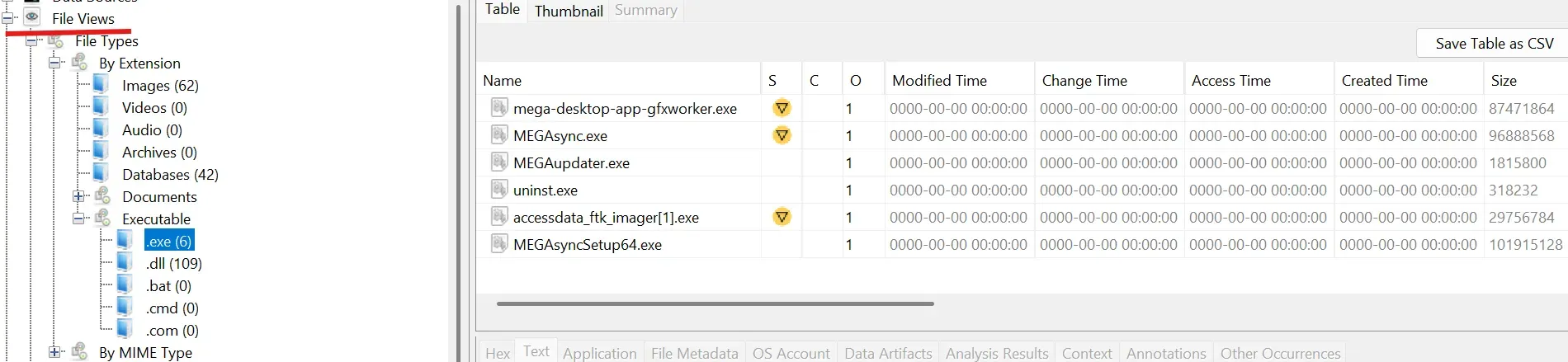
Anyways, let’s go back to Autopsy. It feels like there are not many artifacts in this challenge, so we shouldn’t get lost too easily. We know it’s an executable. so let go to Autopsy, under the file views tab, we have a section for executables. We can see the .exe tab only has 6 items, so let’s take a look. All of them seem like legit MEGA files, except one: accessdata_ftk_imager[1].exe.
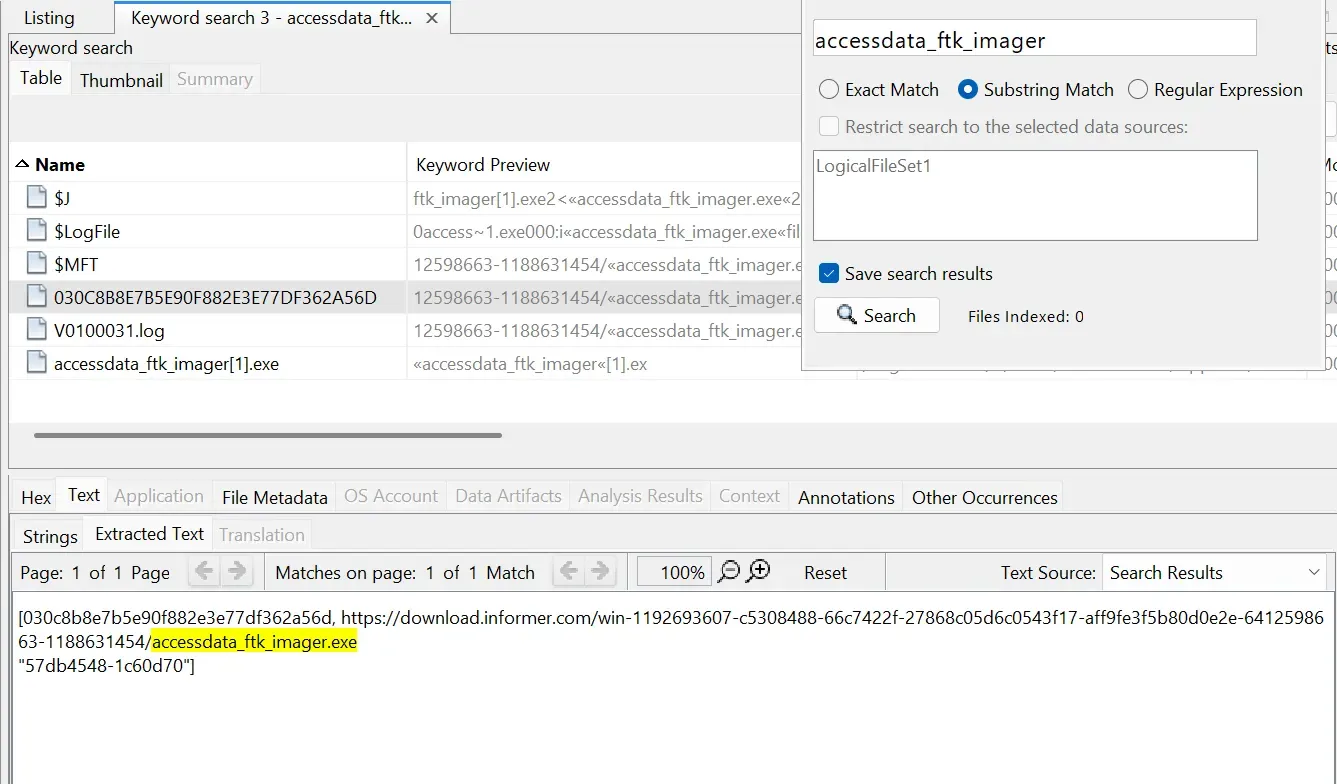
Let’s search Autopsy and see what we get. Going through the 6 files, we find the URL:
https://download.informer.com/win-1192693607-c5308488-66c7422f-27868c05d6c0543f17-aff9fe3f5b80d0e2e-6412598663-1188631454/accessdata_ftk_imager.exe
Converting that URL into an SHA-1 hash, we get:
4621cdc24718ed95bd6271e26b0e28307f159b32
Looking at the location of this file (030C8...), we find it’s located under the CryptnetUrlCache folder. After a little bit of Googling, I found that this folder is where
certutil.exe
drops files when dealing with certificates.
Questions 3, 4, 5, and 6:
For Q5, the answer is
MEGA
as we’ve seen it’s already installed. Some Googling tells us that MEGA logs are saved in:
%AppData%\Local\Mega Limited\MEGAsync\logs
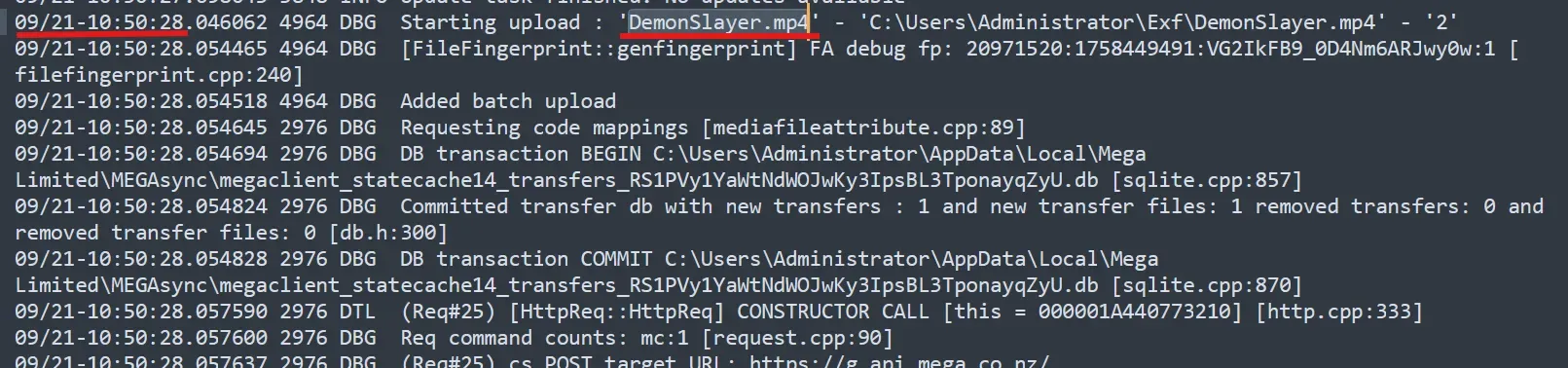
We open up MEGAsync.log and go through it. Inside, we see a file being uploaded called
DemonSlayer.mp4
That answers Q4! Right next to it, we get the timestamp:
2025-09-21 10:50:28.
Q6 is now done.
Now we are only left with Q3. The first thing that came to my mind was parsing the Journal File $J into a CSV. I usually open them with TimelineExplorer, but the filtering will only show me the hit, so here I used Excel normally.
We search for DemonSlayer.mp4. On the first hit, we can see the Rename operation (old and new name). We get the old name:
ntds.dit.
Q3 done!

Putting It All Together
We add all the pieces together and we get the flag:
CyCTF{Certutil,4621cdc24718ed95bd6271e26b0e28307f159b32,ntds.dit,DemonSlayer.mp4,MEGA,2025-09-21 10:50:28 }
and boom,… boom anything , just Incorrect responses one after another and after a few minutes of double checking everything is right , we found it , it was the flag format its _ not ,

CyCTF{Certutil_4621cdc24718ed95bd6271e26b0e28307f159b32_ntds.dit_DemonSlayer.mp4_MEGA_2025-09-21 10:50:28 }
and finally we did it.